本文介紹了canvas環(huán)形倒計時組件的示例代碼,分享給大家,具體如下:
效果如下圖一:

Canvas環(huán)形倒計時組件
Canvas環(huán)形倒計時是基于Canvas實現(xiàn)的倒計時,建議于移動端使用
Canvas環(huán)形倒計時 下載地址
一、如何使用
1. html代碼
ID屬性可隨意取名
<canvas id="canvas"></canvas>
2. 引入process.js文件
頁面引用
<script src="js/process.js"></script>
3. 初始化參數
實例化即可
<script>
    window.onload = function () {
        let ctd = new Countdown();
        ctd.init();
    };

</script>
二、settings參數說明
以下參數非必選項,可根據具體需求配置
window.onload = function () {
        let ctd = new Countdown();
        ctd.init({
            id: "canvas",         // ID,canvas一定要有ID屬性
            size: 130,            // 繪制圓形的最大尺寸,寬=高
            borderWidth: 4,       // 邊框寬度
            borderColor:"#fff",   // 邊框顏色
            outerColor:"#fff",    // 最外層底圓顏色
            scheduleColor:"#fff", // 進度條動畫顏色
            fontColor: "#fff",    // 字體顏色
            ringColor: "#ffc720", // 進度條環(huán)形顏色
            innerColor: "#4e84e5",// 最內圓底色
            fontSize: 50,
            time: 5
        });
    };
三、示例代碼
html
<!DOCTYPE html>
<html lang="en">
<head>
    <meta charset="UTF-8">
    <title>Title</title>
    <style>
        body {
            background: #c2c1ce;
        }
        .container {
            position: absolute;
            left: 50%;
            top: 50%;
            transform: translate(-50%, -50%);
            width: 130px;
            height: 130px;
            text-align: center;
        }
    </style>
</head>
<body>
<div class="container">
    <canvas class="canvas" id="canvas"></canvas>
</div>
<script src="js/process.js"></script>
<script>
    window.onload = function () {
        let ctd = new Countdown();
        ctd.init();
    };
</script>
</body>
</html>
js
/**
 * Created by 譚瞎 on 2018/3/15.
 */

function Countdown() {
    // 設置默認參數
    this.settings = {
        id: "canvas",         // ID,canvas一定要有ID屬性
        size: 130,            // 繪制圓形的最大尺寸,寬=高
        borderWidth: 4,       // 邊框寬度
        borderColor:"#fff",   // 邊框顏色
        outerColor:"#fff",    // 最外層底圓顏色
        scheduleColor:"#fff", // 進度條動畫顏色
        fontColor: "#fff",    // 字體顏色
        ringColor: "#ffc720", // 進度條環(huán)形顏色
        innerColor: "#4e84e5",// 最內圓底色
        fontSize: 50,
        time: 5
    }
}

Countdown.prototype.init = function (opt) {
    this.obj = document.getElementById(this.settings.id);
    this.obj.width = this.settings.size;
    this.obj.height = this.settings.size;
    this.ctx = this.obj.getContext("2d");
    extend(this.settings, opt);
    this.countdown();
};

// 繪制底色
Countdown.prototype.drawBackground = function () {
    this.drawCircle(0, 360, 0, this.settings.outerColor);
};
// 繪制進度條動畫背景
Countdown.prototype.drawProcess = function () {
    this.drawCircle(0, 360, 4, this.settings.ringColor);
};

// 繪制倒計時
Countdown.prototype.drawInner = function () {
    this.drawCircle(0, 360, 23, this.settings.innerColor);
    this.strokeBorder(this.settings.borderWidth);
};

// 繪制進度條動畫
Countdown.prototype.drawAnimate = function () {
    // 旋轉的角度
    let deg = Math.PI / 180;
    let v = schedule * 360,
        startAng = -90,
        endAng = -90 + v;

    this.ctx.beginPath();
    this.ctx.moveTo(this.settings.size / 2, this.settings.size / 2);
    this.ctx.arc(this.settings.size / 2, this.settings.size / 2, this.settings.size / 2 -3, startAng * deg, endAng * deg, false);
    this.ctx.fillStyle = this.settings.scheduleColor;
    this.ctx.fill();
    this.ctx.closePath();

};
// 繪制邊框
Countdown.prototype.strokeBorder = function (borderWidth) {
    this.ctx.lineWidth = borderWidth;
    this.ctx.strokeStyle = this.settings.borderColor;
    this.ctx.stroke();
};
// 繪制文字
Countdown.prototype.strokeText = function (text) {
    this.ctx.textAlign = "center";
    this.ctx.textBaseline = "middle";
    this.ctx.font = this.settings.fontSize+"px"+ " microsoft yahei";
    this.ctx.fillStyle = this.settings.fontColor;
    this.ctx.fillText(text, this.settings.size / 2, this.settings.size / 2);
};
// 繪制圓
Countdown.prototype.drawCircle = function (startAng, endAng, border, fillColor) {
    let deg = Math.PI / 180;
    this.ctx.beginPath();
    this.ctx.arc(this.settings.size / 2, this.settings.size / 2, this.settings.size / 2 -border, startAng * deg, endAng * deg, false);
    this.ctx.fillStyle = fillColor;
    this.ctx.fill();
    this.ctx.closePath();
};
// 進度條動畫
Countdown.prototype.countdown = function () {
    let oldTime = +new Date();
    timer = setInterval(() => {
        let allMs = this.settings.time * 1000,// 如30*1000=30 000ms
            currentTime = +new Date();
        // 步長=(當前的時間-過去的時間)/總秒數
        schedule = (currentTime - oldTime) / allMs;
        this.schedule = schedule;

        this.drawAll(schedule);
        if (currentTime - oldTime >= allMs) {
            // 重繪
            this.drawBackground();
            this.drawProcess();
            this.drawAnimate();
            this.drawInner();
            this.strokeText(0);
            clearInterval(timer);
        }
    }, 100);
};

// 繪制所有
Countdown.prototype.drawAll = function (schedule) {
    schedule = schedule >= 1 ? 1 : schedule;
    let text = parseInt(this.settings.time * (1 - schedule)) + 1;
    // 清除畫布
    this.ctx.clearRect(0, 0, this.settings.size, this.settings.size);
    this.drawBackground();
    this.drawProcess();
    this.drawAnimate();
    this.drawInner();
    this.strokeText(text);
};

// 對象拷貝
function extend(obj1,obj2){
    for(let attr in obj2){
        obj1[attr] = obj2[attr];
    }
}
四、附加——canvas準備工作
canvas其實沒有那么玄乎,它不外乎是一個H5的標簽,跟其它HTML標簽如出一轍:
<canvas id="canvas"></canvas>
注意最好在一開始的時候就給canvas設置好其寬高(若不設定寬高,瀏覽器會默認設置canvas大小為寬300、高100像素),而且不能使用css來設置(會被拉伸),建議直接寫于canvas標簽內部:
<canvas id="canvas" width="130" height="130"></canvas>
canvas本身沒有任何的繪圖能力,所有的繪圖工作都是通過js來實現(xiàn)的。通常我們在js通過getElementById來獲取要操作的canvas(這意味著得給canvas設個id):
var c = document.getElementById("canvas");
var ctx = c.getContext("2d");
1.準備好畫筆之后就可以開始繪圖了,環(huán)形其實就是半徑不同的同心圓,圓心坐標是(size/2,size/2), 先畫一個最大的白色背景底圓,半徑是size/2。
let deg = Math.PI / 180;
// beginPath()可以做到隔離路徑繪制效果的作用,防止之前的效果被污染。
ctx.beginPath();

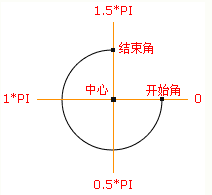
// tcx.arc(圓心X,圓心Y,半徑,起始角度,結束角度,順逆時針);
ctx.arc(size / 2, size / 2, size / 2, 0* deg, 360 * deg, false);
ctx.fillStyle = "#fff";
ctx.fill();
ctx.closePath();

2.開始畫第二個黃色打底圓,圓心也是(size/2,size/2),只是半徑比白色底圓小4px,所以黃色底圓的半徑是(size/2-4)
let deg = Math.PI / 180;
// beginPath()可以做到隔離路徑繪制效果的作用,防止之前的效果被污染。
ctx.beginPath();

// tcx.arc(圓心X,圓心Y,半徑,起始角度,結束角度,順逆時針);
ctx.arc(size / 2, size / 2, size / 2-4, 0* deg, 360 * deg, false);
ctx.fillStyle = "#fff";
ctx.fill();
ctx.closePath();

3.開始畫藍色內圓,同理圓心為(size/2,size/2),半徑為(size-23),再給它加上4px的白色邊框。
let deg = Math.PI / 180;
// beginPath()可以做到隔離路徑繪制效果的作用,防止之前的效果被污染。
ctx.beginPath();

// tcx.arc(圓心X,圓心Y,半徑,起始角度,結束角度,順逆時針);
ctx.arc(size / 2, size / 2, size / 2-23, 0* deg, 360 * deg, false);
ctx.fillStyle = "#fff";
ctx.fill();
ctx.closePath();

// 白色邊框
ctx.lineWidth = 4;
ctx.strokeStyle = #fff;
ctx.stroke();

4.繪制文字,垂直居中
ctx.textAlign = "center";
ctx.textBaseline = "middle";
ctx.fillStyle = "#fff";
// ctx.fillText(文字,相對畫布的X坐標,相對畫布的Y坐標)
ctx.fillText(30, size / 2, size / 2);

5.如何制作動畫?其實也是畫白色圓的過程,慢慢的覆蓋黃色進度條的過程,那么先把白色的圓畫出來出來,這個時候藍圓就會被白色的動畫圓給蓋住,這個時候最后畫藍圓就好了。
let deg = Math.PI / 180;
ctx.beginPath();
// tcx.arc(圓心X,圓心Y,半徑,起始角度,結束角度,順逆時針);
ctx.arc(size / 2, size / 2, size / 2-4, 0* deg, 360 * deg, false);
ctx.fillStyle = "#fff";
ctx.fill();
ctx.closePath();
6.比較簡單的繪畫過程完成了,接下來要將動畫和數字關聯(lián)起來,利用當前的最新時間-最開始的時間,再除總的時間可以得到一個關鍵的百分比,這個百分比決定數字的變化,以及白色動畫圓繪制的角度。
Countdown.prototype.countdown = function () {
    let oldTime = +new Date();// 過去的時間:1522136419291
    timer = setInterval(() => {
        let currentTime = +new Date();// 現(xiàn)在的時間:1522136419393
        let allMs = this.settings.time * 1000;// 總時間豪秒數:如30*1000=30 000ms
        schedule = (currentTime - oldTime) / allMs;// 繪制百分比:(1522136419393-1522136419291)/30000=0.0204
        this.schedule = schedule;
        this.drawAll(schedule);
        if (currentTime - oldTime >= allMs) {
            // 重繪
            this.drawBackground();
            this.drawProcess();
            this.drawAnimate();
            this.drawInner();
            this.strokeText(0);
            clearInterval(timer);
        }
    }, 10);
};

// 繪制所有
Countdown.prototype.drawAll = function (schedule) {
    schedule = schedule >= 1 ? 1 : schedule;
    let text = parseInt(this.settings.time * (1 - schedule)) + 1;
    // 清除畫布
    this.ctx.clearRect(0, 0, this.settings.size, this.settings.size);
    this.drawBackground();
    this.drawProcess();
    this.drawAnimate();
    this.drawInner();
    this.strokeText(text);
};

// 繪制進度條動畫
Countdown.prototype.drawAnimate = function () {
    // 旋轉的角度
    let deg = Math.PI / 180;
    let v = schedule * 360,
        startAng = -90,// 開始角度
        endAng = -90 + v;// 結束角度

    this.ctx.beginPath();
    this.ctx.moveTo(this.settings.size / 2, this.settings.size / 2);
    this.ctx.arc(this.settings.size / 2, this.settings.size / 2, this.settings.size / 2 - 3, startAng * deg, endAng * deg, false);
    this.ctx.fillStyle = this.settings.scheduleColor;
    this.ctx.fill();
    this.ctx.closePath();
};
面向過程版本
/**
    * 進度條動畫
    */
    countdown: function () {
        this.getSystemInfo().then(v => {
            // 自適應
            let width = v.windowWidth,
                size = width >= 414 ? 66 : 400 / 414 * 66;
            size = parseInt(size);
            size = size % 2 ? size + 1 : size;

            let maxtime =30,
                sTime = +new Date,

                temp = setInterval(() => {
                    let time = maxtime * 1000,
                        currentTime = +new Date,
                        schedule = (currentTime - sTime) / time;

                    this.drew(schedule, maxtime, size);

                    if (currentTime - sTime >= time) {
                        // 繪制文字
                        this.setData({
                            schedule: 0
                        });
                        clearInterval(temp);
                    };
                }, 100);

        });
    },

    /**
     * 繪制
     */
    drew: function (schedule, val, size) {
        size = size || 66;
        const _ts = this;
        schedule = schedule >= 1 ? 1 : schedule;

        let text = parseInt(val - val * schedule),
            r = size / 2,
            deg = Math.PI / 180;

        _ts.setData({
            width: size,
            height: size,
            schedule: text + 1
        });

        // 清除畫布
        ctx.clearRect(0, 0, size, size);

        // 繪制白色底
        ctx.beginPath();
        ctx.arc(r, r, r, 0 * deg, 360 * deg);
        ctx.fillStyle = 'rgba(255,255,255,1)';
        ctx.closePath();
        ctx.fill();

        // 繪制橙色
        ctx.beginPath();
        ctx.arc(r, r, r - 2, 0 * deg, 360 * deg);
        ctx.fillStyle = 'rgba(248,200,80,1)';
        ctx.closePath();
        ctx.fill();

        // 繪制白色進度條
        let v = schedule * 360;

        ctx.beginPath();
        ctx.moveTo(r, r);
        ctx.arc(r, r, r, -90 * deg, (-90 + v) * deg);

        ctx.fillStyle = 'rgba(255,255,255,1)';
        ctx.closePath();
        ctx.fill();

        // 中心藍色底
        ctx.beginPath();
        ctx.arc(r, r, r - 12, 0 * deg, 360 * deg);
        ctx.fillStyle = 'rgba(90,140,220,1)';
        ctx.closePath();
        ctx.fill();

        // 繪制文字
        ctx.strokeText();

        // 統(tǒng)一畫
        ctx.draw();

    },
以上就是本文的全部內容,希望對大家的學習有所幫助,也希望大家多多支持腳本之家。