導(dǎo)言:
正如教程《概述插入、更新和刪除數(shù)據(jù)》里探討過的一樣, GridView, DetailsView和FormView Web控件都有內(nèi)置的修改數(shù)據(jù)的功能。當(dāng)聲明綁定到數(shù)據(jù)源控件時,可以快速而方便地修改數(shù)據(jù)——甚至不用寫一行代碼。不幸的是,只有DetailsView和FormView控件提供了內(nèi)置的插入、編輯、刪除功能,而 GridView控件只支持編輯、刪除功能。不過,稍許努力,我們就能使GridView控件包含一個插入界面。
為了給GridView添加插入功能,我們要決定如何添加新記錄:創(chuàng)建插入界面,編碼插入數(shù)據(jù)。在本教程,我們將為GridView的頁腳行(footer row )添加插入界面(見圖1)。其中每一列包含相應(yīng)的用戶界面元件(比如在TextBox里輸入產(chǎn)品名稱,在DropDownLis里選擇供應(yīng)商等等),同時我們需要一個"Add"按鈕,當(dāng)點擊時,發(fā)生頁面回傳,將新記錄添加到表Products里。
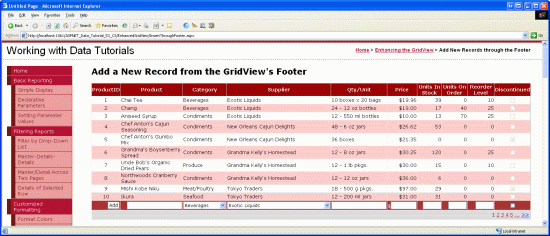
圖1:頁腳行提供了一個添加新記錄的界面
第一步:在GridView控件里展示產(chǎn)品信息
首先添加一個展示產(chǎn)品的GridView控件。打開EnhancedGridView文件夾里的InsertThroughFooter.aspx頁面,在上面添加一個GridView控件,設(shè)其ID為Products,然后,在其智能標(biāo)簽里綁定到一個名為ProductsDataSource的ObjectDataSource 。
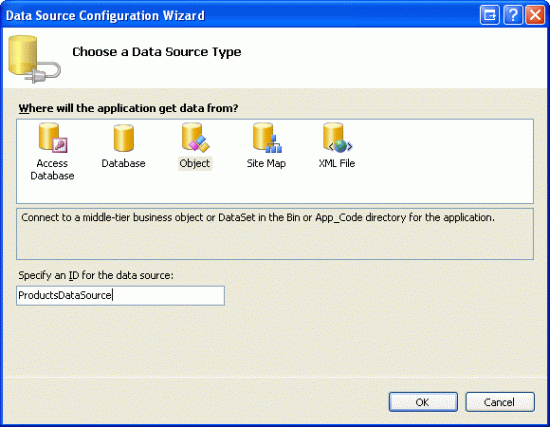
圖2:創(chuàng)建一個名為ProductsDataSource的新ObjectDataSource
設(shè)置該ObjectDataSource調(diào)用ProductsBLL類的GetProducts()方法獲取產(chǎn)品信息。在本教程里,我們只關(guān)注于添加插入功能,與編輯和刪除無關(guān)。所以,確保在“插入”選項卡里選AddProduct()方法。而在“編輯”和“刪除”里選“(None)”。
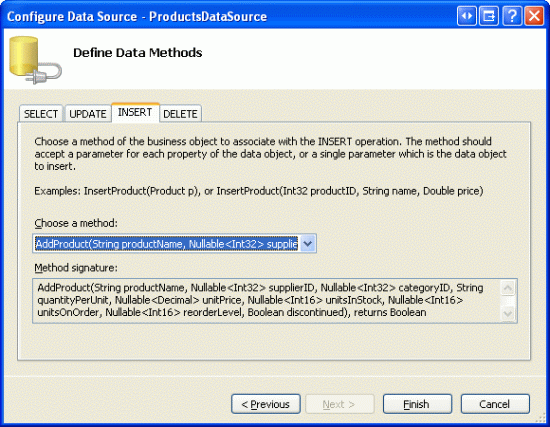
圖3:將 ObjectDataSource的Insert()方法設(shè)置為AddProduct()
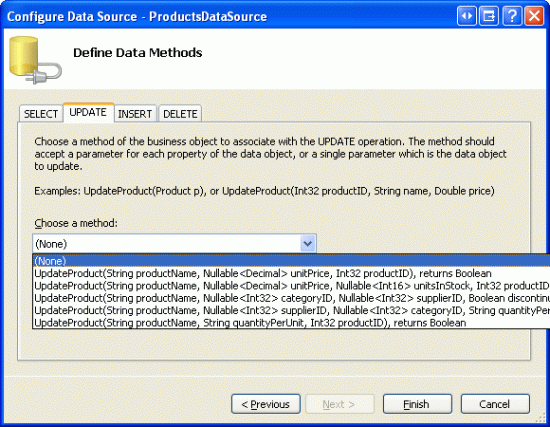
圖4:在UPDATE和DELETE選項里選“(None)”
完成設(shè)置后,Visual Studio會自動添加相關(guān)列。現(xiàn)在,我們暫時不管這些列,在教程后續(xù)部分,我們將移除一些列,因為在添加新記錄時我們不需指定這些列的值。
因為數(shù)據(jù)庫中大概有80個產(chǎn)品,所以我們最好還是啟用分頁功能,以便使插入界面更直觀、更易操作。回到頁面,在GridView的智能標(biāo)簽里啟用分頁。
現(xiàn)在,GridView和ObjectDataSource的聲明代碼看起來和下面的差不多:
asp:GridView ID="Products" runat="server" AutoGenerateColumns="False"
 DataKeyNames="ProductID" DataSourceID="ProductsDataSource"
 AllowPaging="True" EnableViewState="False">
 Columns>
 asp:BoundField DataField="ProductID" HeaderText="ProductID"
  InsertVisible="False" ReadOnly="True"
  SortExpression="ProductID" />
 asp:BoundField DataField="ProductName" HeaderText="ProductName"
  SortExpression="ProductName" />
 asp:BoundField DataField="SupplierID" HeaderText="SupplierID"
  SortExpression="SupplierID" />
 asp:BoundField DataField="CategoryID" HeaderText="CategoryID"
  SortExpression="CategoryID" />
 asp:BoundField DataField="QuantityPerUnit" HeaderText="QuantityPerUnit"
  SortExpression="QuantityPerUnit" />
 asp:BoundField DataField="UnitPrice" HeaderText="UnitPrice"
  SortExpression="UnitPrice" />
 asp:BoundField DataField="UnitsInStock" HeaderText="UnitsInStock"
  SortExpression="UnitsInStock" />
 asp:BoundField DataField="UnitsOnOrder" HeaderText="UnitsOnOrder"
  SortExpression="UnitsOnOrder" />
 asp:BoundField DataField="ReorderLevel" HeaderText="ReorderLevel"
  SortExpression="ReorderLevel" />
 asp:CheckBoxField DataField="Discontinued" HeaderText="Discontinued"
  SortExpression="Discontinued" />
 asp:BoundField DataField="CategoryName" HeaderText="CategoryName"
  ReadOnly="True" SortExpression="CategoryName" />
 asp:BoundField DataField="SupplierName" HeaderText="SupplierName"
  ReadOnly="True" SortExpression="SupplierName" />
 /Columns>
/asp:GridView>

asp:ObjectDataSource ID="ProductsDataSource" runat="server"
 InsertMethod="AddProduct" OldValuesParameterFormatString="original_{0}"
 SelectMethod="GetProducts" TypeName="ProductsBLL">
 InsertParameters>
 asp:Parameter Name="productName" Type="String" />
 asp:Parameter Name="supplierID" Type="Int32" />
 asp:Parameter Name="categoryID" Type="Int32" />
 asp:Parameter Name="quantityPerUnit" Type="String" />
 asp:Parameter Name="unitPrice" Type="Decimal" />
 asp:Parameter Name="unitsInStock" Type="Int16" />
 asp:Parameter Name="unitsOnOrder" Type="Int16" />
 asp:Parameter Name="reorderLevel" Type="Int16" />
 asp:Parameter Name="discontinued" Type="Boolean" />
 /InsertParameters>
/asp:ObjectDataSource>
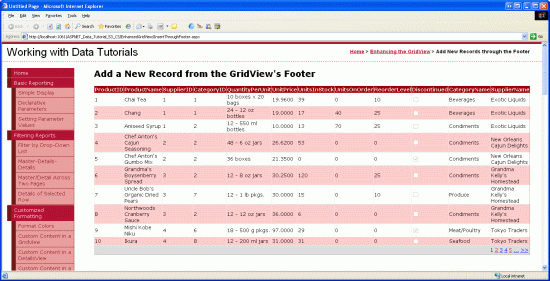
圖5:在一個啟用了分頁功能的GridView里,顯示產(chǎn)品的所有數(shù)據(jù)項
第2步:添加一個頁腳行
GridView控件包含頁眉行、數(shù)據(jù)行和頁腳行。GridView控件ShowHeader和ShowFooter屬性決定了是否顯示頁眉行和頁腳行。如果要顯示頁腳行,我們需要將 ShowFooter屬性設(shè)置為true。如圖6所示:
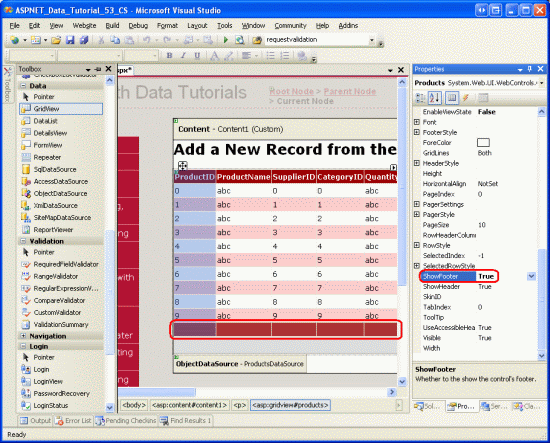
圖6:設(shè)ShowFooter屬性為True,添加頁腳行
我們注意到頁腳行的背景色是深紅色,這是由于我們在教程《使用ObjectDataSource展現(xiàn)數(shù)據(jù)》里創(chuàng)建了一個名為DataWebControls的主題,并將其應(yīng)用為所有的頁面底色。特別的,皮膚文件GridView.skin設(shè)置FooterStyle屬性使用FooterStyle CSS ,其代碼如下:
.FooterStyle
{
 background-color: #a33;
 color: White;
 text-align: right;
}
注意:在以前的教程我們提到過使用GridView的頁腳行。如果不清楚的話,請查閱教程第15章《在GridView的頁腳中顯示統(tǒng)計信息》
設(shè)置ShowFooter屬性為true后,在瀏覽器里觀看效果。當(dāng)前的頁腳行并不包含任何的文字或Web控件。在第3步,我們將修改其包含相應(yīng)的插入界面。
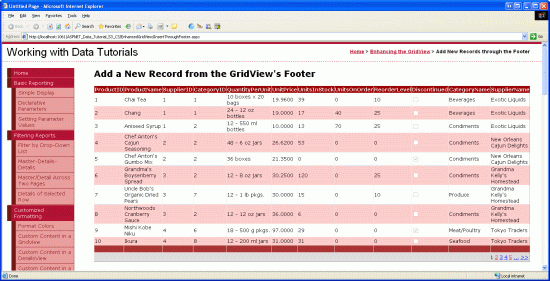
圖7:頁腳行顯示為空白
第3步:自定義頁腳行
回顧教程《在GridView控件中使用TemplateField》,在那篇教程我們探討了如何對GridView的某一列使用TemplateFields(而不是BoundFields或CheckBoxFields) ,從而實現(xiàn)自定義顯示樣式;而在教程《定制數(shù)據(jù)修改界面》里我們看到如何在GridView里使用TemplateFields定制編輯界面。一個TemplateField是由諸如ItemTemplate、EditItemTemplate等模板構(gòu)成的。比如,ItemTemplate模板顯示的數(shù)據(jù)行為只讀狀態(tài);而EditItemTemplate模板定制了一個編輯行界面。
除了ItemTemplate、EditItemTemplate等模板外,TemplateField也包含一個名為FooterTemplate的模板,它為容器指定頁腳行。所以我們可以在FooterTemplate模板里添加插入界面要用到的Web控件。讓我們開始吧,首先,我們將GridView控件里的所有列轉(zhuǎn)換成TemplateFields。在GridView控件的智能標(biāo)簽里點擊“編輯列”,在左邊選中每個域,再點擊“Convert this field into a TemplateField” 。
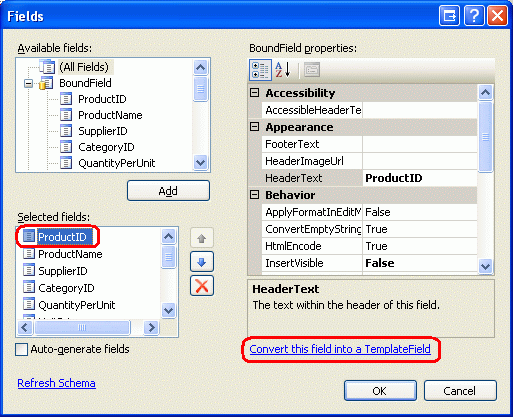
圖8:將每個域轉(zhuǎn)換為一個TemplateField
點擊“Convert this field into a TemplateField”的話,將當(dāng)前類型的域轉(zhuǎn)換成相應(yīng)的TemplateField。比如,每個BoundField將轉(zhuǎn)換成這樣的TemplateField,它的ItemTemplate包含一個Label控件來顯示相應(yīng)的數(shù)據(jù)域;它的EditItemTemplate使用一個TextBox控件來顯示相應(yīng)的數(shù)據(jù)域。例如,在這里,名為ProductName的BoundField將被轉(zhuǎn)換為如下所示的TemplateField :
asp:TemplateField HeaderText="ProductName" SortExpression="ProductName">
 EditItemTemplate>
 asp:TextBox ID="TextBox1" runat="server"
  Text='%# Bind("ProductName") %>'>/asp:TextBox>
 /EditItemTemplate>
 ItemTemplate>
 asp:Label ID="Label2" runat="server"
  Text='%# Bind("ProductName") %>'>/asp:Label>
 /ItemTemplate>
/asp:TemplateField>
同樣的,名為Discontinued的CheckBoxField轉(zhuǎn)換為TemplateField后,其ItemTemplate 和 EditItemTemplate 模板都將包含一個CheckBox Web控件(只是ItemTemplate模板里的CheckBox不可用);而處于“只讀”狀態(tài)的ProductID BoundField轉(zhuǎn)換成TemplateField后,其ItemTemplate 和 EditItemTemplate 模板都包含一個Label控件。簡而言之,將GridView里的某一列轉(zhuǎn)換為一個 TemplateField,是定制自定義模板的一種又快又容易的方法,且不會喪失該列應(yīng)有的功能。
由于我們不需要GridView支持編輯功能,將每個TemplateField的EditItemTemplate模板刪除,只留下ItemTemplate模板。完成后, GridView的代碼看起來應(yīng)和下面的差不多:
asp:GridView ID="Products" runat="server" AutoGenerateColumns="False"
 DataKeyNames="ProductID" DataSourceID="ProductsDataSource"
 AllowPaging="True" EnableViewState="False" ShowFooter="True">
 Columns>
 asp:TemplateField HeaderText="ProductID" InsertVisible="False"
  SortExpression="ProductID">
  ItemTemplate>
  asp:Label ID="Label1" runat="server"
   Text='%# Bind("ProductID") %>'>/asp:Label>
  /ItemTemplate>
 /asp:TemplateField>
 asp:TemplateField HeaderText="ProductName" SortExpression="ProductName">
  ItemTemplate>
  asp:Label ID="Label2" runat="server"
   Text='%# Bind("ProductName") %>'>/asp:Label>
  /ItemTemplate>
 /asp:TemplateField>
 asp:TemplateField HeaderText="SupplierID" SortExpression="SupplierID">
  ItemTemplate>
  asp:Label ID="Label3" runat="server"
   Text='%# Bind("SupplierID") %>'>/asp:Label>
  /ItemTemplate>
 /asp:TemplateField>
 asp:TemplateField HeaderText="CategoryID" SortExpression="CategoryID">
  ItemTemplate>
  asp:Label ID="Label4" runat="server"
   Text='%# Bind("CategoryID") %>'>/asp:Label>
  /ItemTemplate>
 /asp:TemplateField>
 asp:TemplateField HeaderText="QuantityPerUnit"
  SortExpression="QuantityPerUnit">
  ItemTemplate>
  asp:Label ID="Label5" runat="server"
   Text='%# Bind("QuantityPerUnit") %>'>/asp:Label>
  /ItemTemplate>
 /asp:TemplateField>
 asp:TemplateField HeaderText="UnitPrice" SortExpression="UnitPrice">
  ItemTemplate>
  asp:Label ID="Label6" runat="server"
   Text='%# Bind("UnitPrice") %>'>/asp:Label>
  /ItemTemplate>
 /asp:TemplateField>
 asp:TemplateField HeaderText="UnitsInStock"
  SortExpression="UnitsInStock">
  ItemTemplate>
  asp:Label ID="Label7" runat="server"
   Text='%# Bind("UnitsInStock") %>'>/asp:Label>
  /ItemTemplate>
 /asp:TemplateField>
 asp:TemplateField HeaderText="UnitsOnOrder"
  SortExpression="UnitsOnOrder">
  ItemTemplate>
  asp:Label ID="Label8" runat="server"
   Text='%# Bind("UnitsOnOrder") %>'>/asp:Label>
  /ItemTemplate>
 /asp:TemplateField>
 asp:TemplateField HeaderText="ReorderLevel"
  SortExpression="ReorderLevel">
  ItemTemplate>
  asp:Label ID="Label9" runat="server"
   Text='%# Bind("ReorderLevel") %>'>/asp:Label>
  /ItemTemplate>
 /asp:TemplateField>
 asp:TemplateField HeaderText="Discontinued"
  SortExpression="Discontinued">
  ItemTemplate>
  asp:CheckBox ID="CheckBox1" runat="server"
   Checked='%# Bind("Discontinued") %>' Enabled="false" />
  /ItemTemplate>
 /asp:TemplateField>
 asp:TemplateField HeaderText="CategoryName"
  SortExpression="CategoryName">
  ItemTemplate>
  asp:Label ID="Label10" runat="server"
   Text='%# Bind("CategoryName") %>'>/asp:Label>
  /ItemTemplate>
 /asp:TemplateField>
 asp:TemplateField HeaderText="SupplierName"
  SortExpression="SupplierName">
  ItemTemplate>
  asp:Label ID="Label11" runat="server"
   Text='%# Bind("SupplierName") %>'>/asp:Label>
  /ItemTemplate>
 /asp:TemplateField>
 /Columns>
/asp:GridView>
現(xiàn)在, 每個GridView列都已經(jīng)轉(zhuǎn)換成一個TemplateField,我們在其FooterTemplate里添加適當(dāng)?shù)牟迦虢缑妗H欢行┝袥]有插入界面(比如ProductID),其它列的TemplateField模板將包含Web控件,供用戶輸入產(chǎn)品信息。
在GridView的智能標(biāo)簽里點擊“Edit Templates”,從下拉列表里選擇某列的 FooterTemplate模板,從工具箱里拖一個適當(dāng)?shù)目丶巾撁嫔稀?/p>
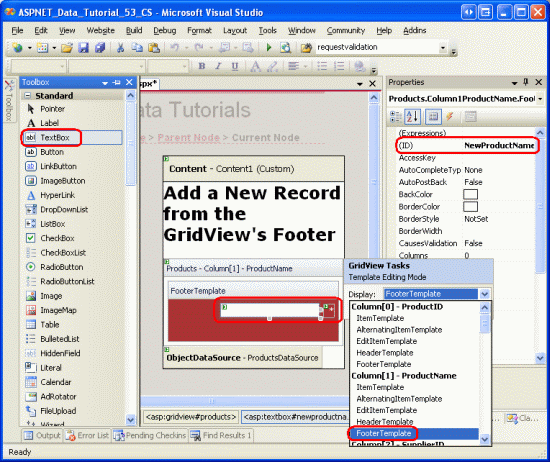
圖9:在每列的FooterTemplate里添加適當(dāng)?shù)牟迦虢缑妗?/strong>
下面列出了GridView的所有列,并指定每列添加哪些插入界面:
ProductID – 無
ProductName –添加一個TextBox,ID為NewProductName;再添加一個
RequiredFieldValidator控件,防止用戶未輸入產(chǎn)品名。
SupplierID –無
CategoryID – 無
QuantityPerUnit – 添加一個TextBox,ID為NewQuantityPerUnit
UnitPrice – 添加一個TextBox,ID為NewUnitPrice,再添加一個CompareValidator控件,確保用戶輸入的是貨幣值,且>=0
UnitsInStock –添加一個TextBox,ID為NewUnitsInStock,再添加一個CompareValidator控件,確保用戶輸入的是整數(shù)值,且>=0
UnitsOnOrder – 添加一個TextBox,ID為NewUnitsOnOrder,再添加一個CompareValidator控件,確保用戶輸入的是整數(shù)值,且>=0
ReorderLevel –添加一個TextBox,ID為NewReorderLevel,再添加一個CompareValidator控件,確保用戶輸入的是整數(shù)值,且>=0
Discontinued–添加一個CheckBox,ID為NewDiscontinued
CategoryName ––添加一個DropDownList控件,ID為NewCategoryID。將其綁定到一個名為CategoriesDataSource的ObjectDataSource控件,設(shè)置它調(diào)用CategoriesBLL類的GetCategories() 方法。設(shè)置DropDownList控件顯示CategoryName,并將DropDownList控件的values設(shè)置為CategoryID
SupplierName –添加一個DropDownList控件,ID為NewSupplierID.將其綁定到一個名為SuppliersDataSource的ObjectDataSource控件,設(shè)置它調(diào)用SuppliersBLL類的GetSuppliers()方法.設(shè)置DropDownList控件顯示CompanyName ,并將DropDownList控件的values設(shè)置為SupplierID.
將每個validation控件的ForeColor屬性清空,以便用在FooterStyle CSS類定義的白色背景色取代默認的紅色;同時將ErrorMessage設(shè)置為詳細的錯誤提示;將Text屬性設(shè)置為星號。在每個FooterTemplates里,只要包含有validation控件,將其Wrap屬性設(shè)置為false。最后,在GridView控件下面添加一個ValidationSummary 控件,設(shè)ShowMessageBox屬性為true;ShowSummary屬性為false。
當(dāng)添加一個新產(chǎn)品時,我們需要給出CategoryID和SupplierID值。頁面上的2個DropDownList控件顯示的是CategoryName 和SupplierName,但傳遞的是我們需要的
CategoryID和SupplierID值。為什么不直接顯示CategoryID和SupplierID值呢?因為最終用戶對CategoryName 和SupplierName更感興趣。既然現(xiàn)在可以在顯示CategoryName 和SupplierName的插入界面獲取對應(yīng)的CategoryID和SupplierID值,我們將CategoryID 和SupplierID 2個TemplateFields從GridView移除。
同樣,當(dāng)添加新產(chǎn)品時我們不需要ProductID,那么我們也可以刪除ProductID TemplateField,不過,在這里我們保留它。除了TextBoxes,DropDownLists、
CheckBoxes以及validation控件外,我們還需要在插入界面添加一個“Add”按鈕。當(dāng)點擊該按鈕時,將新記錄添加到數(shù)據(jù)庫。在第4步,我們將在ProductID TemplateField的FooterTemplate模板添加一個“Add”按鈕。
按你喜歡的方式改進外觀。比如,將UnitPrice值格式化為貨幣形式;將UnitsInStock, UnitsOnOrder和ReorderLevel三列放在右邊;修改TemplateFields的HeaderText屬性等。
在FooterTemplates里完成插入界面的修改后,移除SupplierID 和 CategoryID TemplateFields,最終,你的GridView控件的聲明代碼看起來應(yīng)該和下面的差不多:
asp:GridView ID="Products" runat="server" AutoGenerateColumns="False"
 DataKeyNames="ProductID" DataSourceID="ProductsDataSource"
 AllowPaging="True" EnableViewState="False" ShowFooter="True">
 Columns>
 asp:TemplateField HeaderText="ProductID" InsertVisible="False"
  SortExpression="ProductID">
  ItemTemplate>
  asp:Label ID="Label1" runat="server"
   Text='%# Bind("ProductID") %>'>/asp:Label>
  /ItemTemplate>
  ItemStyle HorizontalAlign="Center" />
 /asp:TemplateField>
 asp:TemplateField HeaderText="Product" SortExpression="ProductName">
  ItemTemplate>
  asp:Label ID="Label2" runat="server"
   Text='%# Bind("ProductName") %>'>/asp:Label>
  /ItemTemplate>
  FooterTemplate>
  asp:TextBox ID="NewProductName" runat="server">/asp:TextBox>
  asp:RequiredFieldValidator ID="RequiredFieldValidator1"
   runat="server" ControlToValidate="NewProductName"
   Display="Dynamic" ForeColor=""
   ErrorMessage="You must enter a name for the new product.">
   * /asp:RequiredFieldValidator>
  /FooterTemplate>
  FooterStyle Wrap="False" />
 /asp:TemplateField>
 asp:TemplateField HeaderText="Category" SortExpression="CategoryName">
  ItemTemplate>
  asp:Label ID="Label10" runat="server"
   Text='%# Bind("CategoryName") %>'>/asp:Label>
  /ItemTemplate>
  FooterTemplate>
  asp:DropDownList ID="NewCategoryID" runat="server"
   DataSourceID="CategoriesDataSource"
   DataTextField="CategoryName" DataValueField="CategoryID">
  /asp:DropDownList>
  asp:ObjectDataSource ID="CategoriesDataSource" runat="server"
   OldValuesParameterFormatString="original_{0}"
   SelectMethod="GetCategories" TypeName="CategoriesBLL">
  /asp:ObjectDataSource>
  /FooterTemplate>
 /asp:TemplateField>
 asp:TemplateField HeaderText="Supplier" SortExpression="SupplierName">
  ItemTemplate>
  asp:Label ID="Label11" runat="server"
   Text='%# Bind("SupplierName") %>'>/asp:Label>
  /ItemTemplate>
  FooterTemplate>
  asp:DropDownList ID="NewSupplierID" runat="server"
   DataSourceID="SuppliersDataSource"
   DataTextField="CompanyName" DataValueField="SupplierID">
  /asp:DropDownList>asp:ObjectDataSource ID="SuppliersDataSource"
   runat="server" OldValuesParameterFormatString="original_{0}"
   SelectMethod="GetSuppliers" TypeName="SuppliersBLL">
  /asp:ObjectDataSource>
  /FooterTemplate>
 /asp:TemplateField>
 asp:TemplateField HeaderText="Qty/Unit" SortExpression="QuantityPerUnit">
  ItemTemplate>
  asp:Label ID="Label5" runat="server"
   Text='%# Bind("QuantityPerUnit") %>'>/asp:Label>
  /ItemTemplate>
  FooterTemplate>
  asp:TextBox ID="NewQuantityPerUnit" runat="server">/asp:TextBox>
  /FooterTemplate>
 /asp:TemplateField>
 asp:TemplateField HeaderText="Price" SortExpression="UnitPrice">
  ItemTemplate>
  asp:Label ID="Label6" runat="server"
   Text='%# Bind("UnitPrice", "{0:c}") %>'>/asp:Label>
  /ItemTemplate>
  FooterTemplate>
  $asp:TextBox ID="NewUnitPrice" runat="server" Columns="8" />
  asp:CompareValidator ID="CompareValidator1" runat="server"
   ControlToValidate="NewUnitPrice"
   ErrorMessage="You must enter a valid currency value greater than
   or equal to 0.00. Do not include the currency symbol."
   ForeColor="" Operator="GreaterThanEqual" Type="Currency"
   ValueToCompare="0" Display="Dynamic">
   * /asp:CompareValidator>
  /FooterTemplate>
  ItemStyle HorizontalAlign="Right" />
  FooterStyle Wrap="False" />
 /asp:TemplateField>
 asp:TemplateField HeaderText="Units In Stock"
  SortExpression="Units In Stock">
  ItemTemplate>
  asp:Label ID="Label7" runat="server"
   Text='%# Bind("UnitsInStock") %>'>/asp:Label>
  /ItemTemplate>
  FooterTemplate>
  asp:TextBox ID="NewUnitsInStock" runat="server" Columns="5" />
  asp:CompareValidator ID="CompareValidator2" runat="server"
   ControlToValidate="NewUnitsInStock" Display="Dynamic"
   ErrorMessage="You must enter a valid numeric value for units
   in stock that's greater than or equal to zero."
   ForeColor="" Operator="GreaterThanEqual" Type="Integer"
   ValueToCompare="0">*/asp:CompareValidator>
  /FooterTemplate>
  ItemStyle HorizontalAlign="Right" />
  FooterStyle Wrap="False" />
 /asp:TemplateField>
 asp:TemplateField HeaderText="Units On Order" SortExpression="UnitsOnOrder">
  ItemTemplate>
  asp:Label ID="Label8" runat="server"
   Text='%# Bind("UnitsOnOrder") %>'>/asp:Label>
  /ItemTemplate>
  FooterTemplate>
  asp:TextBox ID="NewUnitsOnOrder" runat="server" Columns="5" />
  asp:CompareValidator ID="CompareValidator3" runat="server"
   ControlToValidate="NewUnitsOnOrder" Display="Dynamic"
   ErrorMessage="You must enter a valid numeric value for units on
   order that's greater than or equal to zero."
   ForeColor="" Operator="GreaterThanEqual" Type="Integer"
   ValueToCompare="0">*/asp:CompareValidator>
  /FooterTemplate>
  ItemStyle HorizontalAlign="Right" />
  FooterStyle Wrap="False" />
 /asp:TemplateField>
 asp:TemplateField HeaderText="Reorder Level" SortExpression="ReorderLevel">
  ItemTemplate>
  asp:Label ID="Label9" runat="server"
   Text='%# Bind("ReorderLevel") %>'>/asp:Label>
  /ItemTemplate>
  FooterTemplate>
  asp:TextBox ID="NewReorderLevel" runat="server" Columns="5" />
  asp:CompareValidator ID="CompareValidator4" runat="server"
   ControlToValidate="NewReorderLevel" Display="Dynamic"
   ErrorMessage="You must enter a valid numeric value for reorder
   level that's greater than or equal to zero."
   ForeColor="" Operator="GreaterThanEqual" Type="Integer"
   ValueToCompare="0">*/asp:CompareValidator>
  /FooterTemplate>
  ItemStyle HorizontalAlign="Right" />
  FooterStyle Wrap="False" />
 /asp:TemplateField>
 asp:TemplateField HeaderText="Discontinued" SortExpression="Discontinued">
  ItemTemplate>
  asp:CheckBox ID="CheckBox1" runat="server"
   Checked='%# Bind("Discontinued") %>' Enabled="false" />
  /ItemTemplate>
  FooterTemplate>
  asp:CheckBox ID="NewDiscontinued" runat="server" />
  /FooterTemplate>
  ItemStyle HorizontalAlign="Center" />
  FooterStyle HorizontalAlign="Center" />
 /asp:TemplateField>
 /Columns>
/asp:GridView>
在瀏覽器里查看該頁面時,GridView控件的頁腳行顯示為一個比較完善的插入界面(如圖10所示)。此時,插入界面并不包含一種方法將輸入的數(shù)據(jù)添加進數(shù)據(jù)庫。并將我們也沒有闡述那些鍵入的數(shù)據(jù)是如何轉(zhuǎn)換成一條記錄的。在第4步,我們將看到如何添加一個“Add ”按鈕,在頁面回傳后如何執(zhí)行代碼。在第5步,我們看如何將鍵入的數(shù)據(jù)轉(zhuǎn)換成一條記錄添加到數(shù)據(jù)庫。
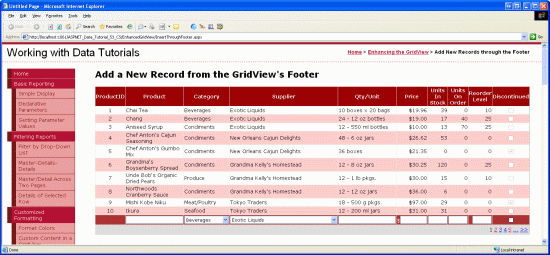
圖10:GridView的頁腳行提供了添加新記錄的界面
第4步:在插入界面添加Add按鈕
如前所述我們需要在界面添加一個Add按鈕,我們可以在某個FooterTemplate里或另外增加一列來放置該按鈕來達到這個目的。在本教程,我們在ProductID TemplateField的FooterTemplate里添加該按鈕。
點擊GridView的智能標(biāo)簽中的“編輯模板”,選擇ProductID對應(yīng)的 FooterTemplate ,添加一個Button Web控件(LinkButton 或是ImageButton,只要你喜歡), 設(shè)ID為AddProduct;CommandName屬性為Insert;Text屬性為“Add”,如圖11所示:
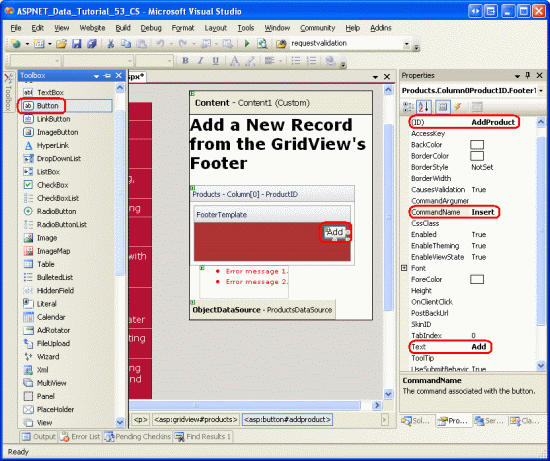
圖11:將Add Button放在ProductID TemplateField的FooterTemplate模板
添加按鈕后,在瀏覽器查看該頁面。如果我們在界面輸入無效的數(shù)據(jù),再點Add按鈕時,頁面回轉(zhuǎn)中斷,同時ValidationSummary控件詳細的列出了那些無效數(shù)據(jù)(如圖12)。當(dāng)輸入適當(dāng)?shù)臄?shù)據(jù)后,再點按鈕,將引發(fā)頁面回傳,但是沒有記錄添加到數(shù)據(jù)庫里。我們需要編寫代碼實現(xiàn)插入數(shù)據(jù)的功能。
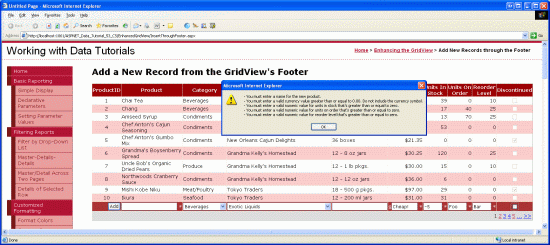
圖12:如果輸入的是無效數(shù)據(jù),將會使頁面回轉(zhuǎn)中斷
注意:界面里的validation控件未被設(shè)置為一組,當(dāng)頁面中只有插入界面包含validation控件的話,運行沒問題。但是,如果在頁面中還有其它的validation控件的話(比如,如果還存在一個編輯界面,其中也包含validation控件),我們應(yīng)該將插入界面里的validation控件和Add按鈕的ValidationGroup屬性設(shè)置為同一個值,使其為一個特定的確認組。
第5步:向表Products添加一條新記錄
當(dāng)使用GridView控件的內(nèi)置的編輯功能時,GridView會自動的處理編輯產(chǎn)品所必要的工作。當(dāng)點擊編輯按鈕時,它把在編輯頁面鍵入的數(shù)據(jù)拷貝到ObjectDataSource的UpdateParameters參數(shù)集包含的參數(shù),再調(diào)用ObjectDataSource控件的Update()方法執(zhí)行更新。由于GridView沒有提供內(nèi)置的功能供插入數(shù)據(jù),我們必須編寫代碼調(diào)用ObjectDataSource控件的Insert()方法,將在插入界面鍵入的數(shù)據(jù)復(fù)制到 ObjectDataSource控件的InsertParameters集合里。
就像在教程28章《GridView里的Button》里探討的一樣,任何時候,只要點擊 GridView控件里的Button, LinkButton或ImageButton,發(fā)生頁面回轉(zhuǎn)時引發(fā)GridView的RowCommand事件。不管這些Button, LinkButton、ImageButton控件是顯式添加的(比如,在頁腳行添加的Add按鈕),或者是GridView控件自動添加的(比如啟用分頁功能或排序功能時,頂部的出現(xiàn)的那些LinkButton)。
為相應(yīng)用戶點擊Add按鈕,我們要為GridView的RowCommand事件創(chuàng)建一個事件處理器。由于任何時候點擊GridView控件的任何Button, LinkButton或ImageButton都會觸發(fā)該事件,我們必須指定當(dāng)傳入事件處理器的CommandName屬性值與Add按鈕的一致時(即:“Insert”),并且鍵入的數(shù)據(jù)無誤時,才執(zhí)行插入操作。代碼如下:
protected void Products_RowCommand(object sender, GridViewCommandEventArgs e)
{
 // Insert data if the CommandName == "Insert"
 // and the validation controls indicate valid data...
 if (e.CommandName == "Insert"  Page.IsValid)
 {
 // TODO: Insert new record...
 }
}
注意:你可能會很奇怪為什么還要檢查Page.IsValid屬性呢?畢竟,如果在插入界面輸入了無效的數(shù)據(jù)時,頁面回傳會中斷。檢查Page.IsValid屬性是為了防止用戶未啟用JavaScript或巧妙的繞過客戶端驗證的情況。簡而言之,如果沒有進行客戶端進行有效性驗證的話,在處理數(shù)據(jù)以前必須在服務(wù)器端再進行一次有效性驗證。
在第1步,ObjectDataSource控件ProductsDataSource的Insert()方法映射的是ProductsBLL類的AddProduct方法。為了在表Products里添加新記錄,我們只需要簡單的調(diào)用ObjectDataSource的Insert()方法:
protected void Products_RowCommand(object sender, GridViewCommandEventArgs e)
{
 // Insert data if the CommandName == "Insert"
 // and the validation controls indicate valid data...
 if (e.CommandName == "Insert"  Page.IsValid)
 {
 // Insert new record
 ProductsDataSource.Insert();
 }
}
現(xiàn)在可以調(diào)用Insert()方法,剩下的步驟是把在插入界面鍵入的值傳遞給ProductsBLL類的AddProduct方法中的參數(shù)。就像在教程17章《研究插入、更新和刪除的關(guān)聯(lián)事件》探討的一樣,可以通過ObjectDataSource控件的Inserting事件來實現(xiàn)。在Inserting事件里,我們需要編程訪問頁腳行里的控件,將其值賦給e.InputParameters集合。當(dāng)用戶忽略了某個值時——比如使ReorderLevel文本框為空,我們應(yīng)該指定該值為NULL。因為AddProducts方法允許那些nullable類型的列接收NULL值。代碼如下:
protected void ProductsDataSource_Inserting
 (object sender, ObjectDataSourceMethodEventArgs e)
{
 // Programmatically reference Web controls in the inserting interface...
 TextBox NewProductName =
 (TextBox)Products.FooterRow.FindControl("NewProductName");
 DropDownList NewCategoryID =
 (DropDownList)Products.FooterRow.FindControl("NewCategoryID");
 DropDownList NewSupplierID =
 (DropDownList)Products.FooterRow.FindControl("NewSupplierID");
 TextBox NewQuantityPerUnit =
 (TextBox)Products.FooterRow.FindControl("NewQuantityPerUnit");
 TextBox NewUnitPrice =
 (TextBox)Products.FooterRow.FindControl("NewUnitPrice");
 TextBox NewUnitsInStock =
 (TextBox)Products.FooterRow.FindControl("NewUnitsInStock");
 TextBox NewUnitsOnOrder =
 (TextBox)Products.FooterRow.FindControl("NewUnitsOnOrder");
 TextBox NewReorderLevel =
 (TextBox)Products.FooterRow.FindControl("NewReorderLevel");
 CheckBox NewDiscontinued =
 (CheckBox)Products.FooterRow.FindControl("NewDiscontinued");

 // Set the ObjectDataSource's InsertParameters values...
 e.InputParameters["productName"] = NewProductName.Text;

 e.InputParameters["supplierID"] =
 Convert.ToInt32(NewSupplierID.SelectedValue);
 e.InputParameters["categoryID"] =
 Convert.ToInt32(NewCategoryID.SelectedValue);

 string quantityPerUnit = null;
 if (!string.IsNullOrEmpty(NewQuantityPerUnit.Text))
 quantityPerUnit = NewQuantityPerUnit.Text;
 e.InputParameters["quantityPerUnit"] = quantityPerUnit;

 decimal? unitPrice = null;
 if (!string.IsNullOrEmpty(NewUnitPrice.Text))
 unitPrice = Convert.ToDecimal(NewUnitPrice.Text);
 e.InputParameters["unitPrice"] = unitPrice;

 short? unitsInStock = null;
 if (!string.IsNullOrEmpty(NewUnitsInStock.Text))
 unitsInStock = Convert.ToInt16(NewUnitsInStock.Text);
 e.InputParameters["unitsInStock"] = unitsInStock;

 short? unitsOnOrder = null;
 if (!string.IsNullOrEmpty(NewUnitsOnOrder.Text))
 unitsOnOrder = Convert.ToInt16(NewUnitsOnOrder.Text);
 e.InputParameters["unitsOnOrder"] = unitsOnOrder;

 short? reorderLevel = null;
 if (!string.IsNullOrEmpty(NewReorderLevel.Text))
 reorderLevel = Convert.ToInt16(NewReorderLevel.Text);
 e.InputParameters["reorderLevel"] = reorderLevel;

 e.InputParameters["discontinued"] = NewDiscontinued.Checked;
}
添加完Inserting事件處理器后,我們就可以通過GridView控件的頁腳行添加記錄了。開始吧,嘗試添加幾個產(chǎn)品。
優(yōu)化并自定義Add操作
一般來說,點擊Add按鈕后,就將為數(shù)據(jù)庫添加一個新記錄。但是沒有任何直觀的提示反映成功地添加了記錄。的確,應(yīng)該用一個Label Web控件或客戶端的消息框提示用戶已經(jīng)成功地添加了產(chǎn)品,我把它作為一個練習(xí)留給讀者。
本文使用的GridView控件沒有對所顯示的產(chǎn)品進行任何排序,也未允許最終用戶對數(shù)據(jù)排序。因此,產(chǎn)品依它們在數(shù)據(jù)庫中的次序排序——依主鍵值順序。由于每條新添加的記錄的ProductID值比上一條的值大,所以,當(dāng)添加新記錄時,它就自然地排到最后一位了。因此,當(dāng)添加新記錄時,你希望自動地轉(zhuǎn)到GridView控件的最后一頁。怎么才能辦到呢?在RowCommand事件處理器里,調(diào)用ProductsDataSource.Insert()方法后,緊接著添加如下一行代碼,它說明當(dāng)數(shù)據(jù)綁定到GridView后將轉(zhuǎn)到最后一頁:
// Indicate that the user needs to be sent to the last page
SendUserToLastPage = true;
其中SendUserToLastPage是頁面層(page-level)的布爾變量,其初始值為false。在GridView控件的DataBound事件處理器中,如果SendUserToLastPage為false(譯注:應(yīng)該是true),PageIndex屬性將使用戶轉(zhuǎn)到最后一頁。
protected void Products_DataBound(object sender, EventArgs e)
{
 // Send user to last page of data, if needed
 if (SendUserToLastPage)
 Products.PageIndex = Products.PageCount - 1;
}
為什么我們要在DataBound事件處理器(而不是在RowCommand事件處理器)里設(shè)置PageIndex屬性呢?如果在RowCommand里設(shè)置PageIndex屬性的話,它返回的是在添加新記錄之前的PageIndex值。在大多數(shù)情況下,這樣做是沒有問題的,但是,如果新添加的記錄剛好落到新的一頁(譯注:比如原本有80個產(chǎn)品,分為8頁顯示,此時末頁的PageIndex為7,當(dāng)添加第81條記錄時,新添加的產(chǎn)品變成第9頁第1條記錄了,此時末頁的PageIndex為8,而不是添加產(chǎn)品前的7),而我們使用RowCommand里設(shè)置的PageIndex值話,頁面將跳往倒數(shù)第2頁,而不是我們期望的末頁。而DataBound事件是在添加產(chǎn)品且重新綁定以后才發(fā)生,我們在DataBound事件處理器里設(shè)置的PageIndex值才是真正的末頁的PageIndex值。
最后,本文用到的GridView看起來相當(dāng)寬,因為添加產(chǎn)品信息要用到很多列。因此,最好將它設(shè)置為豎向排列。另外我們可以減少輸入列來縮小整體寬度,也許我們添加新產(chǎn)品時用不到UnitsOnOrder、UnitsInStock、ReorderLevel這幾項,那么在GridView里將其移除即可。
刪除UnitsOnOrder、UnitsInStock、ReorderLevel列后需要做調(diào)整,有2種方法:
1.仍然使用AddProduct方法,不過其需要傳入UnitsOnOrder、UnitsInStock、ReorderLevel列的值。我們可以在Inserting事件處理器中,對上述3列使用“硬編碼”值或默認值。
2.在ProductsBLL類里對AddProduct方法重載,使其不需要傳入UnitsOnOrder、UnitsInStock、ReorderLevel列的值。然后,在ASP.NET page頁面設(shè)置ObjectDataSource使用重載的AddProduct方法。
以上2種方法都能奏效。在以前的教程里我們使用的是后者,對ProductsBLL類的UpdateProduct方法多次重載。
總結(jié):
DetailsView和FormView控件擁有內(nèi)置的inserting插入數(shù)據(jù)功能,而GridView沒有。不過我們可以使用GridView控件的頁腳行來達到此目的。要顯示頁腳行只需要設(shè)置ShowFooter屬性為true。我們可以這樣對頁腳行進行用戶定制:將每一列轉(zhuǎn)換成TemplateField,并在其FooterTemplate模板定制插入界面。正如我們在本章看到的那樣,F(xiàn)ooterTemplate 模板可以包含Buttons,TextBoxes, DropDownLists,CheckBoxes, data source controls,validation controls等控件,除此以外,為了便于用戶輸入,Add按鈕, LinkButton或ImageButton等也是必需的。
當(dāng)點擊Add按鈕后,將調(diào)用ObjectDataSource控件的Insert()方法,進而使用其映射的插入數(shù)據(jù)方法(具體到本文,即為ProductsBLL類的AddProduct方法),在調(diào)用具體的插入數(shù)據(jù)方法前,我們需要將插入界面里鍵入的數(shù)據(jù)傳遞ObjectDataSource控件的InsertParameters集合。要達到該目的,我們應(yīng)該在ObjectDataSource控件的Inserting事件處理器里,編程訪問插入界面的Web控件。
本教程探討了優(yōu)化GridView外觀的技巧。接下來的一系列教程,我們看如何使用2進制數(shù)據(jù)——比如images, PDFs, Word documents等等,當(dāng)然還有data Web控件。
祝編程快樂!
作者簡介
本系列教程作者 Scott Mitchell,著有六本ASP/ASP.NET方面的書,是4GuysFromRolla.com的創(chuàng)始人,自1998年以來一直應(yīng)用 微軟Web技術(shù)。大家可以點擊查看全部教程《[翻譯]Scott Mitchell 的ASP.NET 2.0數(shù)據(jù)教程》,希望對大家的學(xué)習(xí)ASP.NET有所幫助。
您可能感興趣的文章:- 在ASP.NET 2.0中操作數(shù)據(jù)之十五:在GridView的頁腳中顯示統(tǒng)計信息
- 在ASP.NET 2.0中操作數(shù)據(jù)之三:創(chuàng)建母版頁和站點導(dǎo)航
- asp.net母版頁如何使用
- ASP.NET母版頁基礎(chǔ)知識介紹
- ASP.NET中母版頁和shtml實例入門
- ASP.Net巧用窗體母版頁實例
- asp.net使用母版頁中使用ajax腳本取數(shù)據(jù)
- ASP.NET下母版頁和內(nèi)容頁中的事件發(fā)生順序整理
- ASP.NET 2.0 中的創(chuàng)建母版頁
- asp.net利用母版制作頁腳效果