簡介
mpldatacursor包可以為matplotlib提供交互式的數據光標(彈出式注釋框)。
它的典型功能是:
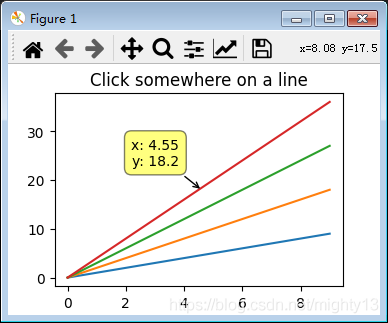
鼠標左鍵單擊圖表數據元素時會彈出文本框顯示最近的數據元素的坐標值。鼠標右鍵單擊文本框取消顯示數據光標。- 按
d鍵時切換顯示\關閉數據光標。
安裝
如果matplotlib版本低于3.3可以直接使用pip安裝
pip install mpldatacursor
如果matplotlib版本高于3.3,雖然pip安裝成功,但是運行案例時會出現AttributeError: 'ScalarFormatter' object has no attribute 'pprint_val'錯誤。
通過查看源碼可知:
try:
  # Again, older versions of mpl
  return formatter.pprint_val(x)
except AttributeError:
  # 3.3.0 or later
  return formatter.format_data_short(x)
通過分析,預計是因為使用了國內pip源,mpldatacursor包還未修復該問題(pip 安裝的 mpldatacursor包版本號是0.7.1)。
因此,建議到https://github.com/joferkington/mpldatacursor
下載源碼,進行源碼安裝(源碼安裝的 mpldatacursor包版本號是0.7.dev0)。
基本應用(官方實例)解析
應用流程
mpldatacursor包基本應用方式比較簡單:
- 從
mpldatacursor包中導入datacursor函數。
- 應用
datacursor函數。
包結構
查看源碼可知,mpldatacursor包的結構如下:
mpldatacursor
   convenience.py
   datacursor.py
   pick_info.py
   __init__.py
datacursor函數定義在convenience.py中,datacursor函數的返回值是DataCursor類實例。
DataCursor類定義在datacursor.py中。
pick_info.py定義了一系列和彈出文本框相關的函數,供DataCursor類調用。
datacursor函數定義
由 datacursor函數定義可知:
datacursor函數可以不提供參數,這樣圖像內所有數據元素都會應用交互式數據光標。datacursor函數可以指定哪些數據元素應用交互式數據光標。
def datacursor(artists=None, axes=None, **kwargs):
  """
  Create an interactive data cursor for the specified artists or specified
  axes. The data cursor displays information about a selected artist in a
  "popup" annotation box.

  If a specific sequence of artists is given, only the specified artists will
  be interactively selectable. Otherwise, all manually-plotted artists in
  *axes* will be used (*axes* defaults to all axes in all figures).

  Parameters
  -----------
  artists : a matplotlib artist or sequence of artists, optional
    The artists to make selectable and display information for. If this is
    not specified, then all manually plotted artists in `axes` will be
    used.
  axes : a matplotlib axes of sequence of axes, optional
    The axes to selected artists from if a sequence of artists is not
    specified. If `axes` is not specified, then all available axes in all
    figures will be used.
  tolerance : number, optional
    The radius (in points) that the mouse click must be within to select
    the artist. Default: 5 points.
  formatter : callable, optional
    A function that accepts arbitrary kwargs and returns a string that will
    be displayed with annotate. Often, it is convienent to pass in the
    format method of a template string, e.g.
    ``formatter="{label}".format``.
    Keyword arguments passed in to the `formatter` function:
      `x`, `y` : floats
        The x and y data coordinates of the clicked point
      `event` : a matplotlib ``PickEvent``
        The pick event that was fired (note that the selected
        artist can be accessed through ``event.artist``).
      `label` : string or None
        The legend label of the selected artist.
      `ind` : list of ints or None
        If the artist has "subitems" (e.g. points in a scatter or
        line plot), this will be a list of the item(s) that were
        clicked on. If the artist does not have "subitems", this
        will be None. Note that this is always a list, even when
        a single item is selected.
    Some selected artists may supply additional keyword arguments that
    are not always present, for example:
      `z` : number
        The "z" (usually color or array) value, if present. For an
        ``AxesImage`` (as created by ``imshow``), this will be the
        uninterpolated array value at the point clicked. For a
        ``PathCollection`` (as created by ``scatter``) this will be the
        "c" value if an array was passed to "c".
      `i`, `j` : ints
        The row, column indicies of the selected point for an
        ``AxesImage`` (as created by ``imshow``)
      `s` : number
        The size of the selected item in a ``PathCollection`` if a size
        array is specified.
      `c` : number
        The array value displayed as color for a ``PathCollection``
        if a "c" array is specified (identical to "z").
      `point_label` : list
        If `point_labels` is given when the data cursor is initialized
        and the artist has "subitems", this will be a list of the items
        of `point_labels` that correspond to the selected artists.
        Note that this is always a list, even when a single artist is
        selected.
      `width`, `height`, `top`, `bottom` : numbers
        The parameters for ``Rectangle`` artists (e.g. bar plots).
  point_labels : sequence or dict, optional
    For artists with "subitems" (e.g. Line2D's), the item(s) of
    `point_labels` corresponding to the selected "subitems" of the artist
    will be passed into the formatter function as the "point_label" kwarg.
    If a single sequence is given, it will be used for all artists with
    "subitems". Alternatively, a dict of artist:sequence pairs may be given
    to match an artist to the correct series of point labels.
  display : {"one-per-axes", "single", "multiple"}, optional
    Controls whether more than one annotation box will be shown.
    Default: "one-per-axes"
  draggable : boolean, optional
    Controls whether or not the annotation box will be interactively
    draggable to a new location after being displayed. Defaults to False.
  hover : boolean, optional
    If True, the datacursor will "pop up" when the mouse hovers over an
    artist. Defaults to False. Enabling hover also sets
    `display="single"` and `draggable=False`.
  props_override : function, optional
    If specified, this function customizes the parameters passed into the
    formatter function and the x, y location that the datacursor "pop up"
    "points" to. This is often useful to make the annotation "point" to a
    specific side or corner of an artist, regardless of the position
    clicked. The function is passed the same kwargs as the `formatter`
    function and is expected to return a dict with at least the keys "x"
    and "y" (and probably several others).
    Expected call signature: `props_dict = props_override(**kwargs)`
  keybindings : boolean or dict, optional
    By default, the keys "d" and "t" will be bound to deleting/hiding all
    annotation boxes and toggling interactivity for datacursors,
    respectively. If keybindings is False, the ability to hide/toggle
    datacursors interactively will be disabled. Alternatively, a dict of
    the form {'hide':'somekey', 'toggle':'somekey'} may specified to
    customize the keyboard shortcuts.
  date_format : string, optional
    The strftime-style formatting string for dates. Used only if the x or y
    axes have been set to display dates. Defaults to "%x %X".
  display_button: int, optional
    The mouse button that will triggers displaying an annotation box.
    Defaults to 1, for left-clicking. (Common options are 1:left-click,
    2:middle-click, 3:right-click)
  hide_button: int or None, optional
    The mouse button that triggers hiding the selected annotation box.
    Defaults to 3, for right-clicking. (Common options are 1:left-click,
    2:middle-click, 3:right-click, None:hiding disabled)
  keep_inside : boolean, optional
    Whether or not to adjust the x,y offset to keep the text box inside the
    figure. This option has no effect on draggable datacursors. Defaults to
    True. Note: Currently disabled on OSX and NbAgg/notebook backends.
  **kwargs : additional keyword arguments, optional
    Additional keyword arguments are passed on to annotate.

  Returns
  -------
  dc : A ``mpldatacursor.DataCursor`` instance
  """
官方實例源碼
import matplotlib.pyplot as plt
import numpy as np
from mpldatacursor import datacursor

data = np.outer(range(10), range(1, 5))

fig, ax = plt.subplots()
lines = ax.plot(data)
ax.set_title('Click somewhere on a line')

datacursor()

plt.show()
限定僅某數據元素使用交互式光標
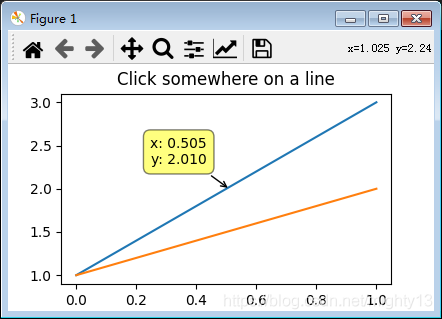
本實例中,有兩個數據元素(artist):line1和line2,datacursor(line1)函數提供了參數line1,因此只有line1可以使用交互式數據光標,line2則沒有效果。
import matplotlib.pyplot as plt
import numpy as np
from mpldatacursor import datacursor
fig, ax = plt.subplots()
line1 = ax.plot([1,3])
line2 = ax.plot([1,2])
ax.set_title('Click somewhere on a line')
datacursor(line1)
plt.show()
其他官方實例功能概述
mpldatacursor提供了大量實際案例,詳見https://github.com/joferkington/mpldatacursor/tree/master/examples。不再一一分析,僅簡單說明功能。
basic_single_annotation.py:在多子圖情況下,默認每個子圖的數據光標是獨立的,即每個子圖都可以顯示數據光標,相互不影響。使用datacursor(display='single')參數后,僅在當前子圖顯示數據光標,其余子圖顯示的數據光標自動關閉。change_popup_color.py:提供了兩個案例,一個取消了提示框的邊框,一個將提示框的背景色改為白色。hover_example.py:將數據光標的觸發方式由鼠標左鍵單擊改為鼠標懸浮。show_artist_labels.py:將數據光標默認顯示的坐標值改為數據元素的label。highlighting_example.py:點擊數據元素時,數據元素會高亮(黃色)顯示。draggable_example.py:在一個子圖中,同時顯示多個數據光標。customize_keyboard_shortcuts.py:重新綁定數據光標快捷鍵。labeled_points_example.py:自定義數據點標簽。date_example.py:日期數據顯示。bar_example.py:在柱狀圖中,在每個柱上方鼠標懸浮觸發數據光標。
總結
mpldatacursor歷史悠久,但是遲遲沒有發布支持matplotlib3.3的穩定版,建議源碼安裝開發版,或者使用mplcursors包https://github.com/anntzer/mplcursors。
mpldatacursor功能上還是挺豐富的,可以作為深入學習matplotlib交互的案例。
到此這篇關于matplotlib交互式數據光標mpldatacursor的實現 的文章就介紹到這了,更多相關matplotlib交互式數據光標內容請搜索腳本之家以前的文章或繼續瀏覽下面的相關文章希望大家以后多多支持腳本之家!
您可能感興趣的文章:- matplotlib交互式數據光標實現(mplcursors)