| 屬性 | 描述 | .NET |
|---|---|---|
| AutoPostBack | 規定在 Checked 屬性已改變后,是否立即向服務器回傳表單。默認是 false。 | 1.0 |
| CausesValidation | 規定點擊 Button 控件時是否執行驗證。 | 2.0 |
| Checked | 規定是否已選中該復選框。 | 1.0 |
| InputAttributes | 該 CheckBox 控件的 Input 元素所用的屬性名和值的集合。 | 2.0 |
| LabelAttributes | 該 CheckBox 控件的 Label 元素所用的屬性名和值的集合。 | 2.0 |
| runat | 規定該控件是服務器控件。必須被設置為 "server"。 | 1.0 |
| Text | 與復選框關聯的文本標簽。 | 1.0 |
| TextAlign | 與復選框關聯的文本標簽的對齊方式。(right 或 left) | 1.0 |
| ValidationGroup | 在 CheckBox 控件回發到服務器時要進行驗證的控件組。 | 2.0 |
| OnCheckedChanged | 當 Checked 屬性被改變時,被執行函數的名稱。 |
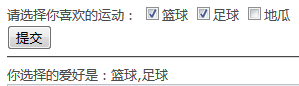
讓我們來做個簡單的示例來演示一下
前臺代碼:
%@ Page Language="C#" AutoEventWireup="true" CodeFile="CheckBox.aspx.cs" Inherits="WebControls_CheckBox" %>

!DOCTYPE html PUBLIC "-//W3C//DTD XHTML 1.0 Transitional//EN" "http://www.w3.org/TR/xhtml1/DTD/xhtml1-transitional.dtd">

html xmlns="http://www.w3.org/1999/xhtml">
head runat="server">
 title>/title>
 style type="text/css">
 .style1
 {
  width: 107px;
 }
 /style>
/head>
body>
 form id="form1" runat="server">
 div>
 h3>CheckBox(復選框)/h3>
 table style="width: 100%;">
  tr>
  td class="style1">
   nbsp;
   屬性/td>
  td>
   值/td>
  td>
   作用/td>
  /tr>
  tr>
  td class="style1">
   nbsp;
   Checked/td>
  td>
   nbsp;
   ture|false/td>
  td>
   nbsp;選中狀態|未選狀態
  /td>
  /tr>
 /table>
 hr />
 請選擇你喜歡的運動:
 asp:CheckBox ID="chkSport" runat="server" Text="籃球" Checked="true" />
 asp:CheckBox ID="chkSport2" runat="server" Text="足球" />
 asp:CheckBox ID="chkSport3" runat="server" Text="地瓜" />
 br />
 asp:Button ID="btnSubmit" runat="server" Text="提交" onclick="btnSubmit_Click" />
 hr />
 你選擇的愛好是:asp:Label ID="lblState" runat="server">/asp:Label>
 /div>
 /form>
/body>
/html>
后臺代碼:
using System;
using System.Collections.Generic;
using System.Web;
using System.Web.UI;
using System.Web.UI.WebControls;

public partial class WebControls_CheckBox : System.Web.UI.Page
{
 protected void Page_Load(object sender, EventArgs e)
 {

 }
 protected void btnSubmit_Click(object sender, EventArgs e)
 {
 lblState.Text = string.Empty;
 if (chkSport.Checked)
 {
  lblState.Text = lblState.Text + chkSport.Text;
 }
 if (chkSport2.Checked)
 {
  if (lblState.Text.Length == 0)
  {
  lblState.Text = chkSport2.Text;
  }
  else
  {
  lblState.Text = lblState.Text + "," + chkSport2.Text;
  }
 }
 if (chkSport3.Checked)
 {
  if (lblState.Text.Length == 0)
  {
  lblState.Text = chkSport2.Text;
  }
  else
  {
  lblState.Text = lblState.Text + "," + chkSport3.Text;
  }
 }
 }
}
運行效果: