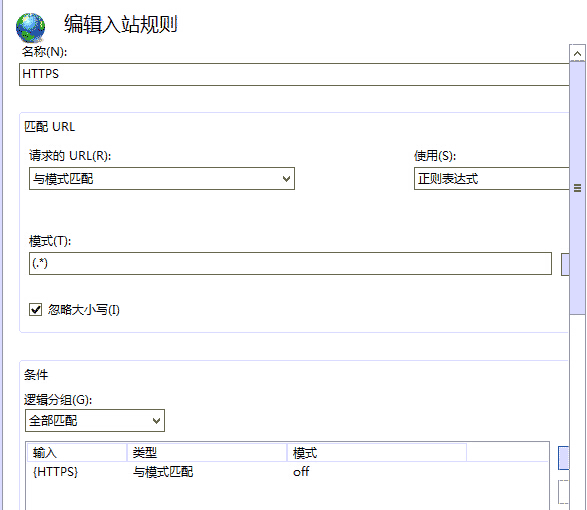
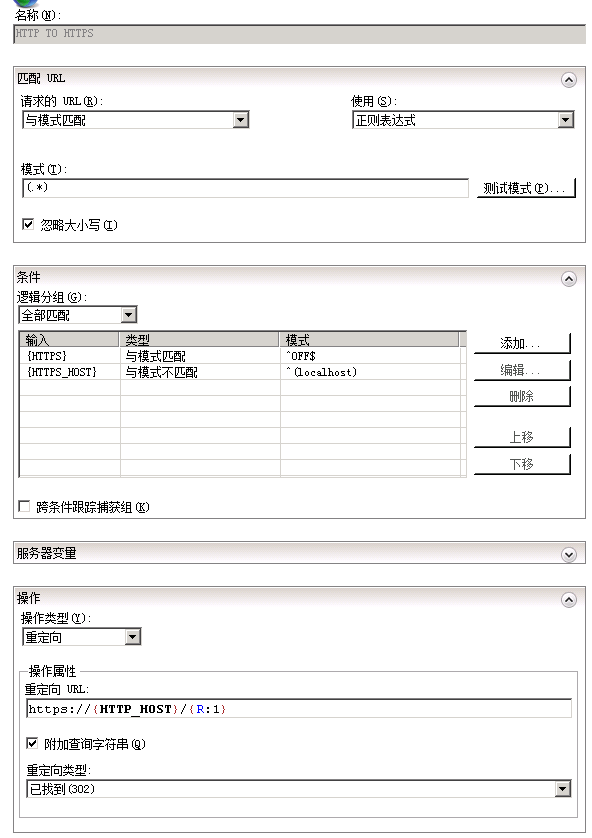
| 輸入 | 類型 | 模式 | 是否忽略大小寫 | 備注 |
|---|---|---|---|---|
| {HTTPS} | 與模式匹配 | ^OFF$ | YES | 此項用來匹配你的請求是HTTPS還是HTTP |
| {HTTPS_HOST} | 與模式不匹配 | ^(localhost) | YES | 如果你是本地的localhost不會重定向到SSL |
高級版(直接把偽靜態添加到web.config)
<?@xml version="1.0" encoding="UTF-8"?>
<configuration>
<system.webServer>
<rewrite>
<rules>
<rule name="HTTP to HTTPS redirect" stopProcessing="true">
<match url="(.*)" />
<conditions>
<add input="{HTTPS}" pattern="off" ignoreCase="true" />
</conditions>
<action type="Redirect" redirectType="Found" url="https://{HTTP_HOST}/{R:1}" />
</rule>
</rules>
</rewrite>
</system.webServer>
</configuration>
到此這篇關于IIS7 IIS8 http自動跳轉到HTTPS(80端口跳轉443端口)的文章就介紹到這了,更多相關http自動跳轉到HTTPS內容請搜索腳本之家以前的文章或繼續瀏覽下面的相關文章希望大家以后多多支持腳本之家!