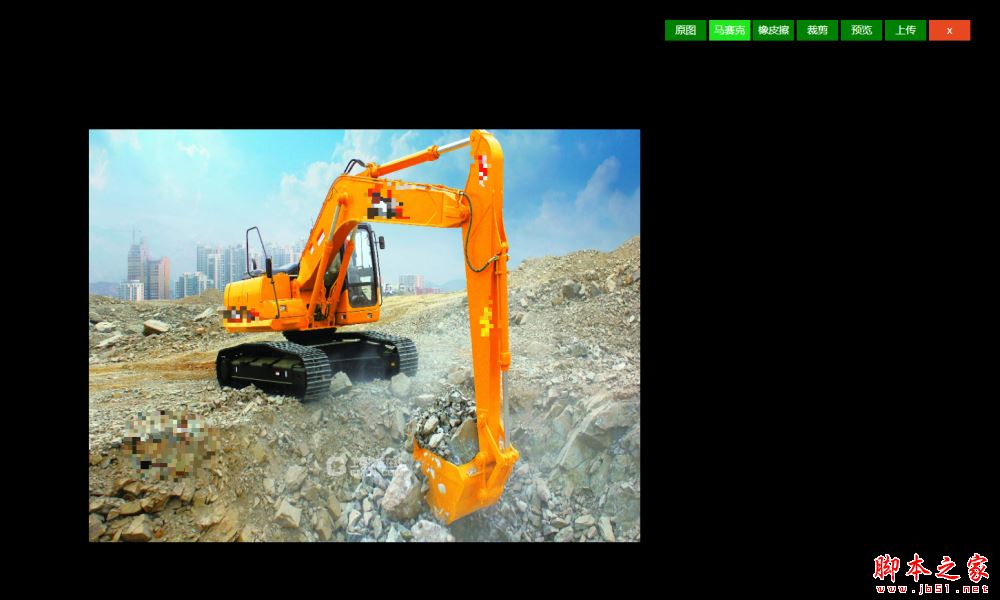
獲取裁剪框(矩形)相對于畫布的位置(左上)和裁剪框的height、width。獲取(getImageData)canvas相應位置的圖片對象(ImageData)。清空canvas畫布。在canvas畫布的相應位置繪制(putImageData)獲取的圖片對象(ImageData)。生成預覽圖。
1)比如現有一鼠標劃過的點的坐標(x,y),定義一個矩形左上角坐標取(x,y),寬30px,高30px。我們把矩形寬高都除以5(分成5份,可以自定義為n份),所以現在是25個6px的小格子。每個小格子寬高都是6px。
2)然后,我們隨機獲取一個小格子,獲取(getImageData)這個小格子的圖片對象(ImageData);再隨機獲取此圖片對象上某個像素點(寬1px,高1px)的顏色color(rgba:ImageData.data[0],ImageData.data[1],ImageData.data[2],ImageData.data[3]);最后我們把第一個6x6px的小格子的每個像素點的顏色都設置為color。
我們需要理解一個問題,不管是繪制馬賽克,還是清除馬賽克,其本質都是在繪制圖片。我們在某個位置繪制了馬賽克,清除的時候,就是把原圖在當前位置的圖片對象再畫出來。就達到了清除的效果。所以,我們需要備份一個canvas,和原圖一模一樣,清除的時候,需要獲取備份畫布上對應位置的圖像,繪制到馬賽克的位置。
<template>
  <div class="canvas-clip" :loading="loading">
    <div
      v-show="isDrop"
      class="canvas-mainBox"
      ref="canvas-mainBox"
      id="canvas-mainBox"
      @mousedown.stop="startMove($event)"
    >
      <div class="canvas-minBox left-up" @mousedown.stop="startResize($event,0)"></div>
      <div class="canvas-minBox up" @mousedown.stop="startResize($event,1)"></div>
      <div class="canvas-minBox right-up" @mousedown.stop="startResize($event,2)"></div>
      <div class="canvas-minBox right" @mousedown.stop="startResize($event,3)"></div>
      <div class="canvas-minBox right-down" @mousedown.stop="startResize($event,4)"></div>
      <div class="canvas-minBox down" @mousedown.stop="startResize($event,5)"></div>
      <div class="canvas-minBox left-down" @mousedown.stop="startResize($event,6)"></div>
      <div class="canvas-minBox left" @mousedown.stop="startResize($event,7)"></div>
    </div>
    <!-- 畫布 -->
    <canvas
      class="canvas-area"
      ref="canvas"
      id="canvas"
      :width="canvasWidth"
      :height="canvasHeight"
      @mousedown.stop="startMove($event)"
      :class="{hoverPaint:isMa,hoverClear:isMaClear}"
    ></canvas>
    <!-- 備份畫布 -->
    <canvas class="canvas-copy" ref="canvasCopy" :width="canvasWidth" :height="canvasHeight"></canvas>
    <div class="canvas-btns">
      <button v-if="backBtn" @click="clipBack">返回</button>
      <button :class="{active:btnIndex==0}" @click="sourceImg">原圖</button>
      <button :class="{active:btnIndex==1}" @click="paintRectReady" :disabled="isDisabled">馬賽克</button>
      <button :class="{active:btnIndex==2}" @click="paintRectClearReady" :disabled="isDisabled">橡皮擦</button>
      <button :class="{active:btnIndex==3}" @click="clipReady" :disabled="isDisabled">裁剪</button>
      <button :class="{active:btnIndex==4}" @click="clipPosition">預覽</button>
      <button @click="getSignature">上傳</button>
      <button class="close" @click="canvasClose()">x</button>
      <!-- <div class="paint-size" v-if="isMaClear || isMa">
        <span>畫筆大小</span>
        <input :defaultValue="maSize" v-model="maSize" max="100" min="1" type="range">
        <span class="size-num">{{maSize}}</span>
      </div> -->
    </div>
  </div>
</template>
<script>
import axios from "axios";
import md5 from "js-md5";
import req from "../../axios/config";
export default {
  props: ["imgUrl"],
  data() {
    return {
      resizeFX: "",
      movePrev: "",
      canvasWidth: 800, // 畫布寬
      canvasHeight: 600, // 畫布高
      loading: false,
      isDrop: false, // 裁剪
      isMa: false, // 馬賽克
      maSize: 30, // 馬賽克大小
      isMaClear: false, // 清除馬賽克
      backBtn: false, // 返回按鈕
      isDisabled: false,//禁用按鈕
      btnIndex: 0,//當前按鈕
      mouseX:'',// 鼠標位置
      mouseY:'',
      clipEle: "", // 裁剪框元素
      canvasDataSession: "", // 預覽前的畫布信息
      canvas: "", // 畫布
      ctx: "", // 畫布上下文
      canvasCopy: "", // copy畫布
      ctxCopy: "", // copy畫布上下文
      uploadOption: { // 圖片上傳參數
        path: "",
        policy: "",
        signature: "",
        username: ""
      }
    };
  },
  mounted() {
    this.clipEle = this.$refs["canvas-mainBox"];
    this.canvas = this.$refs["canvas"];
    this.ctx = this.canvas.getContext("2d");
    this.canvasCopy = this.$refs["canvasCopy"];
    this.ctxCopy = this.canvasCopy.getContext("2d");
    this.draw();
  },
  methods: {
    // 創建圖片
    draw() {
      var img = new Image();
      img.setAttribute('crossOrigin', 'anonymous');
      img.onload = () => {
        this.ctx.drawImage(img, 0, 0, 800, 600);
        this.ctxCopy.drawImage(img, 0, 0, 800, 600);
      };
      img.src = this.imgUrl + '?time=' + new Date().valueOf();
    },
    //預覽 計算裁剪框的位置(左上坐標)
    clipPosition() {
      this.isDisabled = true;
      this.backBtn = true;
      this.isMa = false;
      this.isMaClear = false;
      this.btnIndex = 4;
      //畫布位置
      var canvasPx = this.canvas.offsetLeft,
        canvasPy = this.canvas.offsetTop;
      if (this.isDrop) {
        // 裁剪框位置
        var clipPx = this.clipEle.offsetLeft,
          clipPy = this.clipEle.offsetTop,
          x = clipPx - canvasPx,
          y = clipPy - canvasPy,
          w = this.clipEle.offsetWidth,
          h = this.clipEle.offsetHeight,
          // 預覽圖居中
          positionX = 400 - this.clipEle.offsetWidth / 2,
          positionY = 300 - this.clipEle.offsetHeight / 2;
      } else {
        // 沒有裁剪框,保存完整圖片
        var x = 0,
          y = 0,
          w = this.canvas.offsetWidth,
          h = this.canvas.offsetHeight,
          // 預覽圖居中
          positionX = 0,
          positionY = 0;
      }
      var imageData = this.ctx.getImageData(x, y, w, h);
      this.canvasDataSession = this.ctx.getImageData(
        0,
        0,
        this.canvasWidth,
        this.canvasHeight
      );
      this.ctx.clearRect(0, 0, this.canvasWidth, this.canvasHeight);
      this.ctx.putImageData(imageData, positionX, positionY);
      this.clipEle.style.display = "none";
      this.canvasCopy.style.display = "none";
    },
    // 返回預覽前狀態
    clipBack() {
      this.btnIndex = -1;
      this.backBtn = false;
      this.isDisabled = false;
      this.isDrop = false;
      this.ctx.putImageData(this.canvasDataSession, 0, 0);
      this.canvasCopy.style.display = "block";
    },
    // 原圖
    sourceImg() {
      this.isDisabled = false;
      this.btnIndex = 0;
      this.backBtn = false;
      this.isMa = false;
      this.isDrop = false;
      this.isMaClear = false;
      var img = new Image();
      this.ctx.clearRect(0, 0, this.canvasWidth, this.canvasHeight);
      img.setAttribute('crossOrigin', 'anonymous');
      img.onload = () => {
        this.ctx.drawImage(img, 0, 0, this.canvasWidth, this.canvasHeight);
      };
      img.src = this.imgUrl + '?time=' + new Date().valueOf();
      this.canvasCopy.style.display = "block";
    },
    // 獲取簽名
    getSignature() {
      // canvas圖片base64 轉 File 對象
      var dataURL = this.canvas.toDataURL("image/jpg"),
        arr = dataURL.split(","),
        mime = arr[0].match(/:(.*?);/)[1],
        bstr = atob(arr[1]),
        n = bstr.length,
        u8arr = new Uint8Array(n);
      while (n--) {
        u8arr[n] = bstr.charCodeAt(n);
      }
      var obj = new Blob([u8arr], { type: mime }),
        time = new Date().toGMTString(),
        formData = new FormData();
      formData.append("file", obj);
      // 獲取文件后綴
      var suffix = formData.get("file").type.split("/")[1];
      req
        .get("/carsource-api/upyun/sign", { suffix: suffix })
        .then(response => {
          if (response.data.code === 0) {
            this.uploadOption.path = response.data.data.path;
            formData.append("policy", response.data.data.policy);
            formData.append("authorization", response.data.data.signature);
            this.updateImg(formData);
          }
        })
        .catch(function(error) {});
    },
    // 上傳
    updateImg(formData) {
      axios({
        url: "http://v0.api.upyun.com/tmp-img",
        method: "POST",
        data: formData
      }).then(response => {
        if (response.data.code == 200) {
          this.$message.success("圖片修改成功");
          this.canvasClose("upload", response.data.url.slice(4));
        }
      });
    },
    // 裁剪框縮放 移動
    startResize(e, n) {
      this.resizeFX = n;
      $(document).mousemove(this.resizeDiv);
      document.addEventListener("mouseup", this.stopResize);
    },
    stopResize(e) {
      $(document).off("mousemove", this.resizeDiv);
      document.removeEventListener("mouseup", this.stopResize);
    },
    startMove(e) {
      this.movePrev = [e.pageX, e.pageY];
      $(document).mousemove(this.moveDiv);
      document.addEventListener("mouseup", this.stopMove);
    },
    stopMove(e) {
      $(document).off("mousemove", this.moveDiv);
      document.removeEventListener("mouseup", this.stopMove);
    },
    moveDiv(e) {
      // 馬賽克
      if (this.isMa) {
        this.paintRect(e);
      }
      // 清除馬賽克
      if (this.isMaClear) {
        this.paintRectClear(e);
      }
      // 裁剪
      if (this.isDrop) {
        var targetDiv = $("#canvas-mainBox"),
          offsetArr = targetDiv.offset();
        var chaX = e.pageX - this.movePrev[0],
          chaY = e.pageY - this.movePrev[1],
          ox = parseFloat(targetDiv.css("left")),
          oy = parseFloat(targetDiv.css("top"));
        targetDiv.css({
          left: ox + chaX + "px",
          top: oy + chaY + "px"
        });
        this.movePrev = [e.pageX, e.pageY];
      }
    },
    resizeDiv(e) {
      e.preventDefault();
      e.stopPropagation();
      // 獲取需要改變尺寸元素到頁面的距離
      var targetDiv = $("#canvas-mainBox"),
        offsetArr = targetDiv.offset();
      var eleSWidth = targetDiv.width(),
        eleSHeight = targetDiv.height(),
        ox = parseFloat(targetDiv.css("left")),
        oy = parseFloat(targetDiv.css("top"));
      // 獲取鼠標位置,和元素初始offset進行對比,
      var chaX = e.pageX - offsetArr.left,
        chaY = e.pageY - offsetArr.top;
      switch (this.resizeFX) {
        case 0:
          //如果移動距離接近寬度或高度,則不進行改變
          if (chaX >= eleSWidth - 10 || chaY >= eleSHeight - 10) {
            return;
          }
          // 獲得位置差(m-e),先設置寬度和高度,再設置位置
          // 原始寬高+((m-e)*-1),原始位置+(m-e)
          targetDiv.css({
            width: eleSWidth + chaX * -1 + "px",
            height: eleSHeight + chaY * -1 + "px",
            left: ox + chaX + "px",
            top: oy + chaY + "px"
          });
          break;
        case 1:
          //如果移動距離接近寬度或高度,則不進行改變
          if (chaY >= eleSHeight - 10) {
            return;
          }
          // 獲得位置差(m-e),先設置寬度和高度,再設置位置
          // 原始寬高+((m-e)*-1),原始位置+(m-e)
          targetDiv.css({
            height: eleSHeight + chaY * -1 + "px",
            top: oy + chaY + "px"
          });
          break;
        case 2:
          //如果移動距離接近寬度或高度,則不進行改變
          if (chaX <= 10 || chaY >= eleSHeight - 10) {
            return;
          }
          // 獲得位置差(m-e),先設置寬度和高度,設置位置
          // 原始高+((m-e)*-1),原始寬+((m-e)),原始位置+(m-e)
          targetDiv.css({
            width: chaX + "px",
            height: eleSHeight + chaY * -1 + "px",
            top: oy + chaY + "px"
          });
          break;
        case 3:
          //如果移動距離接近寬度或高度,則不進行改變
          if (chaX <= 10) {
            return;
          }
          // 獲得位置差(m-e),先設置寬度和高度,再設置位置
          // 原始寬高+((m-e)*-1),原始位置+(m-e)
          targetDiv.css({
            width: chaX + "px"
          });
          break;
        case 4:
          //如果移動距離接近寬度或高度,則不進行改變
          if (chaX <= 10 || chaY <= 10) {
            return;
          }
          // 獲得位置差(m-e),先設置寬度和高度,再設置位置
          // 原始寬高+((m-e)*-1),原始位置+(m-e)
          targetDiv.css({
            width: chaX + "px",
            height: chaY + "px"
          });
          break;
        case 5:
          //如果移動距離接近寬度或高度,則不進行改變
          if (chaY <= 10) {
            return;
          }
          // 獲得位置差(m-e),先設置寬度和高度,再設置位置
          // 原始寬高+((m-e)*-1),原始位置+(m-e)
          targetDiv.css({
            height: chaY + "px"
          });
          break;
        case 6:
          //如果移動距離接近寬度或高度,則不進行改變
          if (chaX >= eleSWidth - 10 || chaY <= 10) {
            return;
          }
          // 獲得位置差(m-e),先設置寬度和高度,再設置位置
          // 原始寬高+((m-e)*-1),原始位置+(m-e)
          targetDiv.css({
            width: eleSWidth + chaX * -1 + "px",
            height: chaY + "px",
            left: ox + chaX + "px"
          });
          break;
        case 7:
          //如果移動距離接近寬度或高度,則不進行改變
          if (chaX >= eleSWidth - 10) {
            return;
          }
          // 獲得位置差(m-e),先設置寬度和高度,再設置位置
          // 原始寬高+((m-e)*-1),原始位置+(m-e)
          targetDiv.css({
            width: eleSWidth + chaX * -1 + "px",
            left: ox + chaX + "px"
          });
          break;
        default:
          break;
      }
    },
    // 裁剪
    clipReady() {
      this.btnIndex = 3;
      this.isMa = false;
      this.isDrop = true;
      this.isMaClear = false;
    },
    // 馬賽克
    paintRectReady() {
      this.btnIndex = 1;
      this.isMa = true;
      this.isDrop = false;
      this.isMaClear = false;
    },
    // 橡皮擦
    paintRectClearReady() {
      this.btnIndex = 2;
      this.isMa = false;
      this.isDrop = false;
      this.isMaClear = true;
    },
    // 繪制馬賽克
    paintRect(e) {
      var offT = this.canvas.offsetTop, // 距離上邊距離
        offL = this.canvas.offsetLeft, // 距離左邊距離
        x = e.clientX,
        y = e.clientY;
      if(this.mouseX - x > this.maSize/2 || x - this.mouseX > this.maSize/2 || this.mouseY - y > this.maSize/2 || y - this.mouseY > this.maSize/2){
        var oImg = this.ctx.getImageData(x - offL ,y - offT,this.maSize,this.maSize);
        var w = oImg.width;
        var h = oImg.height;
        //馬賽克的程度,數字越大越模糊
        var num = 6;
        //等分畫布
        var stepW = w/num;
        var stepH = h/num;
        //這里是循環畫布的像素點
        for(var i=0;i<stepH;i++){
          for(var j=0;j<stepW;j++){
            //獲取一個小方格的隨機顏色,這是小方格的隨機位置獲取的
            var color = this.getXY(oImg,j*num+Math.floor(Math.random()*num),i*num+Math.floor(Math.random()*num));
            //這里是循環小方格的像素點,
            for(var k=0;k<num;k++){
                for(var l=0;l<num;l++){
                    //設置小方格的顏色
                    this.setXY(oImg,j*num+l,i*num+k,color);
                }
            }
          }
        }
        this.ctx.putImageData(oImg,x - offL ,y - offT);
        this.mouseX = e.clientX
        this.mouseY = e.clientY
      }
    },
    getXY(obj,x,y){
      var w = obj.width;
      var h = obj.height;
      var d = obj.data;
      var color = [];
      color[0] = d[4*(y*w+x)];
      color[1] = d[4*(y*w+x)+1];
      color[2] = d[4*(y*w+x)+2];
      color[3] = d[4*(y*w+x)+3];
      return color;
    },
    setXY(obj,x,y,color){
      var w = obj.width;
      var h = obj.height;
      var d = obj.data;
      d[4*(y*w+x)] = color[0];
      d[4*(y*w+x)+1] = color[1];
      d[4*(y*w+x)+2] = color[2];
      d[4*(y*w+x)+3] = color[3];
    },
    // 清除馬賽克
    paintRectClear(e) {
      var offT = this.canvasCopy.offsetTop, // 距離上邊距離
        offL = this.canvasCopy.offsetLeft, // 距離左邊距離
        x = e.clientX,
        y = e.clientY,
        // 獲取原圖此位置圖像數據
        imageData = this.ctxCopy.getImageData(
          x - offL,
          y - offT,
          this.maSize,
          this.maSize
        );
      this.ctx.putImageData(imageData, x - offL, y - offT);
    },
    // 關閉畫布
    canvasClose(type, url) {
      this.$emit("isShowImgChange", type, url);
    }
  }
};
</script>
<style scoped>
.canvas-clip {
  position: fixed;
  top: 0;
  bottom: 0;
  left: 0;
  right: 0;
  z-index: 9010;
  background: #000;
}
.canvas-mainBox {
  position: absolute;
  width: 400px;
  height: 300px;
  left: 50%;
  top: 50%;
  margin-left: -200px;
  margin-top: -150px;
  border: 1px solid #FFF;
  cursor: move;
  z-index: 9009;
}
.canvas-minBox {
  position: absolute;
  width: 8px;
  height: 8px;
  background: #FFF;
}
.left-up {
  top: -4px;
  left: -4px;
  cursor: nw-resize;
}
.up {
  top: -4px;
  left: 50%;
  margin-left: -4px;
  cursor: n-resize;
}
.right-up {
  top: -4px;
  right: -4px;
  cursor: ne-resize;
}
.right {
  top: 50%;
  margin-top: -4px;
  right: -4px;
  cursor: e-resize;
}
.right-down {
  bottom: -4px;
  right: -4px;
  cursor: se-resize;
}
.down {
  bottom: -4px;
  left: 50%;
  margin-left: -4px;
  cursor: s-resize;
}
.left-down {
  bottom: -4px;
  left: -4px;
  cursor: sw-resize;
}
.left {
  top: 50%;
  margin-top: -4px;
  left: -4px;
  cursor: w-resize;
}
.canvas-btns {
  position: fixed;
  right: 50px;
  top: 30px;
  z-index: 9003;
}
.canvas-btns button {
  display: inline-blovk;
  background: green;
  cursor: pointer;
  border: none;
  width: 60px;
  height: 30px;
  line-height: 30px;
  color: #fff;
  font-size: 15px;
}
.canvas-btns button.active {
  background: rgb(32, 230, 32);
}
.canvas-btns button.close {
  background: rgb(230, 72, 32);
}
.canvas-copy {
  position: absolute;
  top: 50%;
  left: 50%;
  margin-top: -300px;
  margin-left: -400px;
  z-index: 9007;
}
.canvas-mosatic {
  position: absolute;
  top: 50%;
  left: 50%;
  margin-top: -300px;
  margin-left: -400px;
  z-index: 9009;
}
.canvas-area {
  position: absolute;
  top: 50%;
  left: 50%;
  margin-top: -300px;
  margin-left: -400px;
  z-index: 9008;
}
.paint-size{
  margin-top: 20px;
  font-size: 13px;
  color: #FFF;
  height: 30px;
  line-height: 30px;
  text-align: right;
}
.paint-size input{
  vertical-align: middle;
  background: green;
}
.paint-size .size-num{
  display: inline-block;
  width: 15px;
}
.hoverClear{
  cursor: url('./paint.png'),auto;
}
.hoverPaint{
  cursor: url('./paint.png'),auto;
}
</style>
以上所述是小編給大家介紹的基于Html5 canvas實現裁剪圖片和馬賽克功能及又拍云上傳圖片 功能 ,希望對大家有所幫助,如果大家有任何疑問請給我留言,小編會及時回復大家的。在此也非常感謝大家對腳本之家網站的支持!
如果你覺得本文對你有幫助,歡迎轉載,煩請注明出處,謝謝!